Manufacturing video production: types, costs and planning
A guide to manufacturing video production for marketing leads: which videos to make, how to film inside a plant safely, when to animate, and what drives the cost.

Manufacturing video production covers the films and animations a plant uses to show buyers how its products work, and to show the people it wants to hire what the job is like.
Most manufacturing briefs I see at Moonb, where I work, stall at the plant gate. Sales wants a machine demo before a launch, marketing has a free week, and then the plant manager mentions that the line is fully booked that week, and that the camera can’t see the control panel without showing a customer’s job details. On our manufacturing video production projects, the calendar and the site sign-offs get settled before anyone talks about shots, and I’d tell any marketing or comms lead to do the same before booking a crew.
Which manufacturing videos to make
Manufacturers already make plenty of video. In the Content Marketing Institute’s manufacturing research, drawn from 104 manufacturing marketers who answered between June and August 2024, 85% had used video in the previous 12 months, and video topped their list of most effective formats (74%), well ahead of case studies and customer stories (45%).
None of which tells you which film your plant needs. A buyer checking whether a machine fits their line wants different evidence from a recruit deciding whether to apply, so I start from the question each audience is asking.
| Video type | Question it answers | Where it runs | Main planning risk |
|---|---|---|---|
| Factory and process film | How is this made, and who makes it? | Website, investor pages, sales decks | Needs a plant-wide access and safety plan |
| Product demonstration for complex machinery | How does it work and where does it fit? | Product pages, sales calls, booth screens | Operator steps must appear in the correct order |
| Safety and training video | What exactly must the operator do, step by step? | Onboarding, line terminals, learning platforms | Must match the approved procedure and its version |
| Trade show loop | What is different about this machine? | Booth screens, event pages, social clips | Has to read silently and from across an aisle |
| Recruitment video | What is it like to work here? | Careers page, job boards, social channels | People on camera need consent and must wear the right PPE |
| Animated explainer | What happens inside the equipment? | Sales materials, training, website | Accuracy must be checked against engineering drawings |
If a client could only make one of these, I would push for the factory film, and I would want it to follow the work. Track one material or component from intake to dispatch and keep the inspection step in, since that shot tells a buyer what your quality team actually checks. Montages of machines running are the default, and buyers have seen plenty.
For a demonstration, keep the frame tight around the machine’s starting condition and what the operator does to get to the finished result. Our product demo video walkthrough helps with the script. If compatibility matters, film the connections, the loading arrangement or the footprint a purchasing engineer will ask about.
With training, each task should be easy to find and tied to the approved procedure, and someone has to own the video and pull it the day that procedure changes. Keeping a whole library current is its own job, which the corporate training video production piece gets into.
A trade show loop has to make sense with the sound off to someone walking past, and it is usually cut from footage shot for other uses, so plan it the way you would corporate event video production. Recruitment films go almost the other way. Recruits want the honest shop floor, people and PPE and noise included, and I’d watch a few of the recruitment videos from well-known brands we collected before writing one.
Volvo Trucks filmed a new VNL being built, and it is a fair model of a process film that follows the product through the plant.
The frames I pulled go from a vintage Volvo truck on display to a robot arm in its cell to people fitting out a truck on the assembly line.
Shutdown windows and changeovers as your filming calendar
A line is rarely in one state for a whole visit, and the switch between products often holds the useful footage, especially when buyers or operators need to see setup and restart. Changeovers are long enough to plan around. The PSbyM Process Industries Performance Study, summarized by Milliken, found that changeover time on process plants’ primary production lines averages 42 minutes, and a third of plants report changeovers of an hour or longer. Give that window an owner on the plant side and book the crew against it.
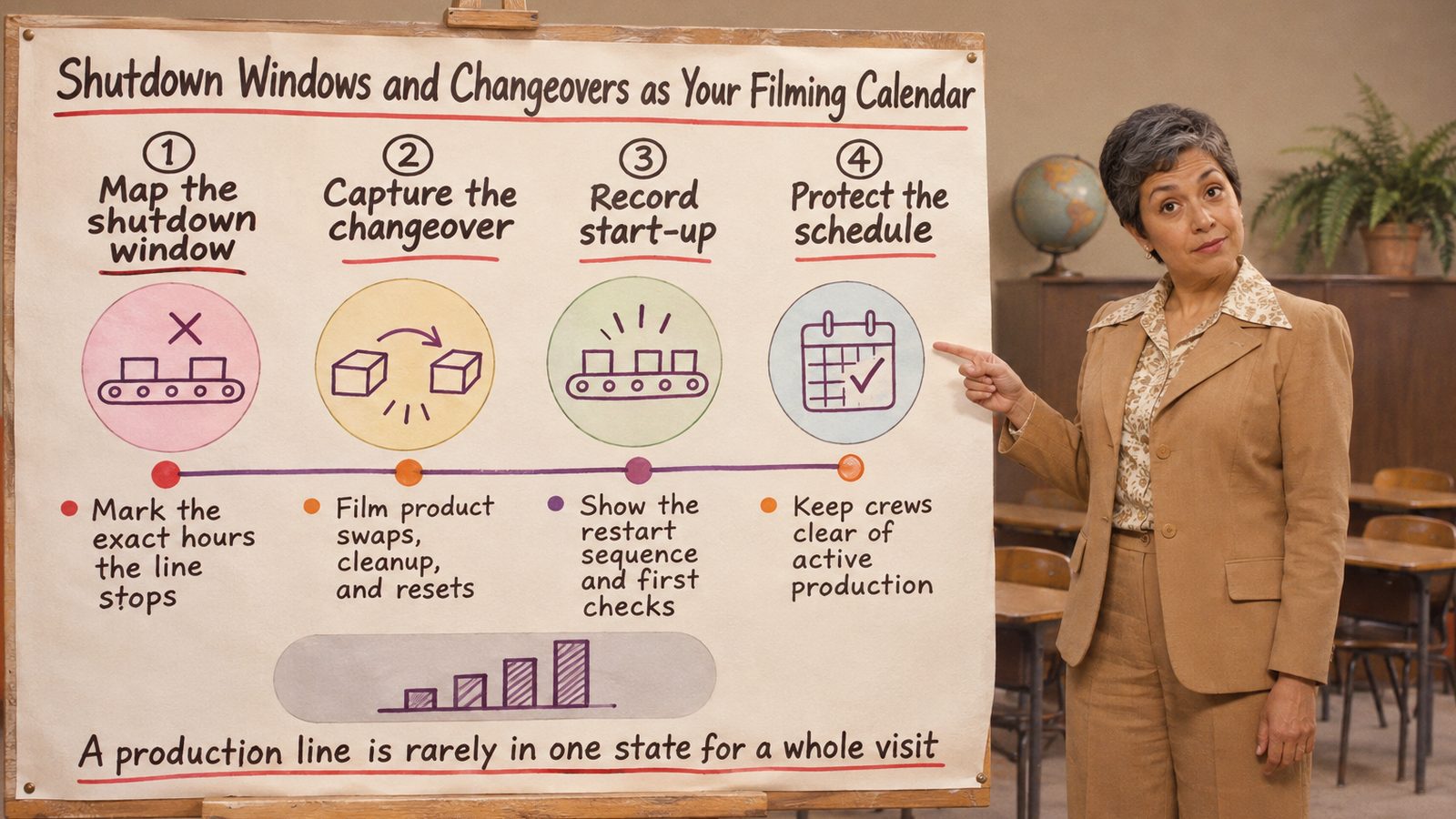
I like to sequence the shots by machine state:
- Steady-state run. Normal operation from a safe position that shows the operator’s view, with the incoming material and the accepted output.
- Preparation. Walk it through with the line lead and agree what can be set up before the machine stops.
- Tooling or material change. Film only what the site confirms is safe to record. Never ask an operator to pause halfway through a critical task so you get a better angle.
- Verification. The first-off check or measurement that decides whether production continues.
- Restart and first good part. End on the accepted part coming off the line, since that’s what a buyer wants to see.
Before the day, agree whether filming can carry on through the changeover, which steps are excluded, and who reviews the technical sequence before anything goes out. In the edit, time markers, labels and close-ups can squeeze a 40-minute changeover into 30 seconds without suggesting a shortcut that doesn’t exist.
If there’s no live access at all, plan a controlled demonstration outside production hours, or move that part of the story into animation and add its approval time to the video production timeline. Hold a spare day either way, because lines stop early and get reassigned.
Pre-shoot checklist for plant managers
Sites treat a film crew as an operational event, and the safety record explains why. OSHA’s summary of 2024 injury and illness data counted 1,478,310 work-related cases recorded by the 392,735 establishments that submitted data, across all industries, and about 15% of the detailed incident reports came from manufacturing. Its spotlight on robots in manufacturing has the line I would underline for any crew: many of the acute injuries happened while workers were cleaning or maintaining robots. Cleaning and maintenance sit very close to what a changeover film wants to capture.
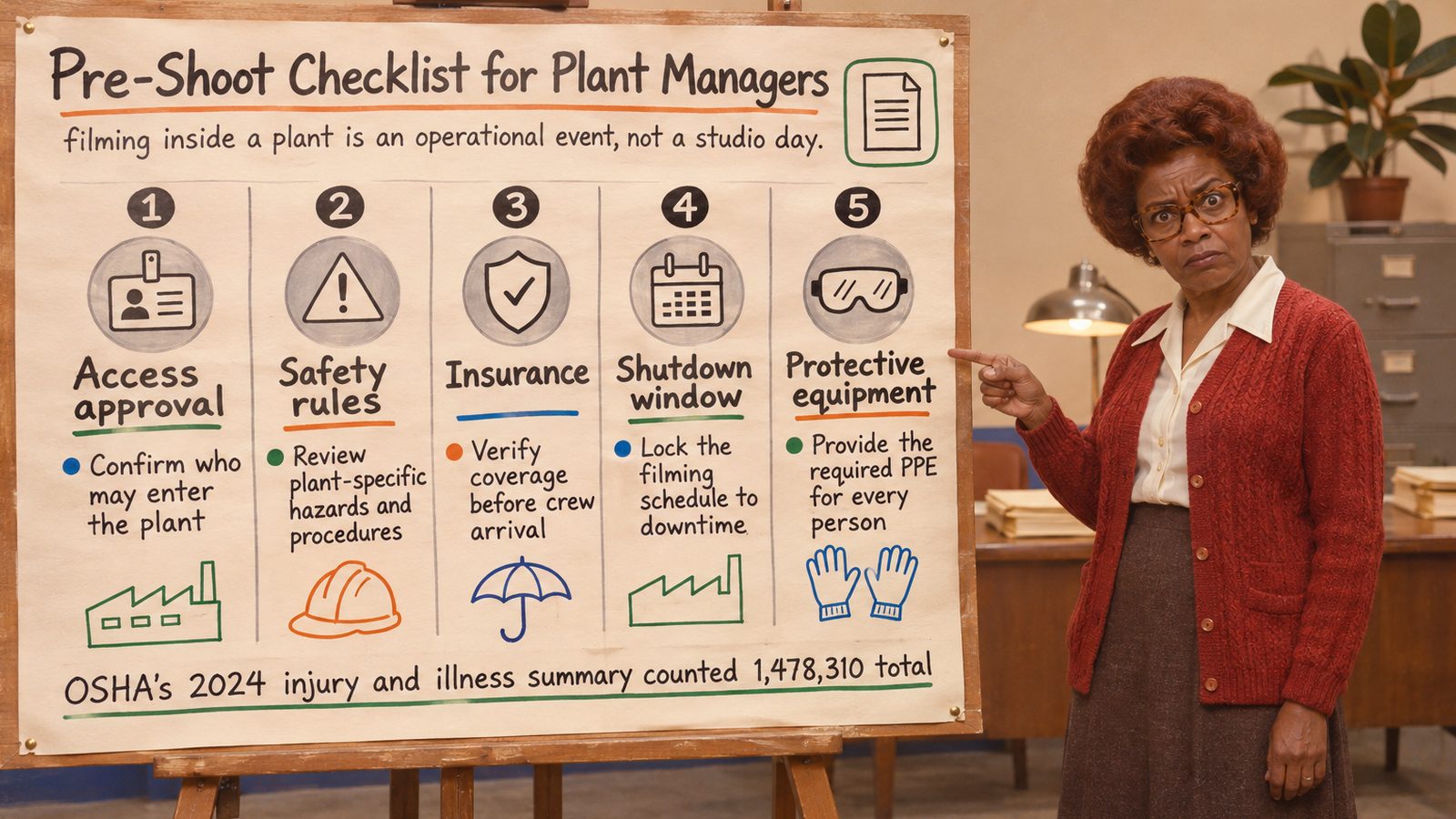
The plant manager or a nominated site lead confirms each of these before the crew arrives, and the signed list goes in with the project’s wider video production checklist.
- Induction booked. Every crew member does the site’s visitor or contractor induction, and site rules apply from the gate, loading and unloading kit included.
- Crew and equipment list sent. Names, cameras, lights, stands and audio kit go to site safety well ahead of the visit, so they can approve access and flag anything unsuitable for the areas you plan to film.
- Insurance accepted. The site contact confirms the crew’s liability certificate, plus any equipment cover the site asks for, before anyone travels.
- PPE matched to the hazard assessment. In the US, OSHA’s general PPE standard requires the employer to assess the workplace for hazards and select protective equipment that protects against them. Ask for that assessment, kit the crew to it, and check the cameras can be run without lifting safety glasses.
- Noise zones marked. OSHA’s noise standard requires a hearing conservation program once workers’ 8-hour average exposure reaches 85 dBA, and in the UK, HSE’s noise regulations page puts hearing protection and hearing protection zones at 85 dB(A). Agree in advance that your sound recordist wears monitoring headphones that also protect their hearing.
- Lockout boundaries reviewed. Filming maintenance or a changeover puts the crew next to machines under the plant’s energy control program. OSHA’s lockout/tagout standard covers servicing where an unexpected start-up or release of stored energy could injure someone. The crew never touches a lock, and never asks for one to be moved for a shot.
- Escorts named. One escort per restricted area, and a named backup for when that person gets called back to the line.
- Shot list approved by engineering and quality, with confidential drawings, customer labels and control-screen data flagged to stay out of frame.
- Qualified operator assigned. Process demonstrations are run by someone authorized on that equipment, never by a presenter learning it on the day.
- Dates reconfirmed. Check the latest production schedule the day before travel, and know who can authorize a change to the filming plan.
- Emergency arrangements and consent. Brief the crew on alarms and assembly points, keep cables out of exits, and collect written consent from everyone identifiable on camera.
Some UK sites hand health and safety to an outside consultant, through a service such as Opus Safety’s outsourced health and safety, which covers assessments from fire risk and COSHH through to noise and DSEAR. If your plant works like that, copy the consultant on the shot list and crew plan, since they know where the noise and other risk assessments sit. One person at the plant still approves filming conditions on the day, and if they don’t like a close-up, change the lens or move the camera.
Technical specs for filming on a factory floor
A factory floor hits you with reflections and noise at once, and machines can change state between takes. I’d much rather solve those on the day than hand them to an editor.
| Setting | Recommended choice | Why it matters on the plant floor |
|---|---|---|
| Resolution | 4K or higher | Room to reframe for close-ups and to cut versions for several platforms |
| Lighting | Portable flicker-free LED with diffusion | Controls reflections from metal and works with overhead fixtures |
| White balance | Set under the actual production lighting | Keeps color consistent from shot to shot |
| Dialogue audio | Lavalier or boom, monitored on headphones | Keeps speech intelligible over machine noise |
| Ambient audio | Separate recording of each machine | Gives the editor real machine sound to sit under narration |
| Shot list | Approved in advance by engineering and quality | Captures tolerances, gauges and inspection points |
Walk the camera through the planned angles before lighting anything. A stainless enclosure may reflect the crew back at you, and a bright inspection station can leave the operator’s face underexposed. I’d move the light or soften it with diffusion long before turning it up.
Shoot a short test under the plant’s own lighting and check it for flicker. Then reset white balance every time you move into a differently lit zone; the loading bay and the assembly hall almost never match.
For interviews, get the mic close enough to favor the voice and monitor it live. If the voice still isn’t clear, move to a quieter spot the site has approved and lay process footage over it. Name every audio file by location and machine state, so the editor finds the right hum for the right shot.
Crews often skip asking engineering what to look at. Engineers will point out the measurement display, the inspection surface, the gauge position and the accepted part, all of which a general crew walks past. Note the material, tooling and screen state before changing angles, so you never cut together shots from different operating conditions in a way that implies a false sequence. And review the rushes on a proper monitor before the crew leaves: critical displays, focus, reflections, audio.
Animating a product too large or too dangerous to film
Film a sealed vessel and you get pipes and an enclosure, when the buyer wants to know what happens inside. High voltage, molten metal, pressurized lines, machines too big to frame and unreleased products have the same problem, and animation gets you inside without putting anyone in the operating hazard.
Scale is where I see it used best. Airbus explains its A350 final assembly line with animation, so one film can walk through stations no single camera position could cover.
An animated map shows parts arriving at the final assembly line in Toulouse, then a rendered hangar labels Station 30 with its job, indoor ground tests and cabin customization. A bar across the top of that frame lists the stations, with 30 picked out, so you know where the aircraft is in the process. I would borrow that bar for almost any multi-step film.
Hazard is the other big reason. The US Chemical Safety Board uses animation to reconstruct incidents that nobody could, or should, have filmed.
In one frame of the Kuraray America reconstruction, a circular window is cut into a vessel to show the liquid level inside, laid over the plant model. The same device works in a marketing film about normal operation.
It works at small sizes as well. MA Hydraulics’ guide to the 4 bar pressure relief valve explains in text how the valve opens in service, with a spring holding the closing element against its seat until inlet pressure lifts it, and uses a door closer as the analogy. A guide like that is the natural home for a ten-second animated cutaway.
Then there are products that only exist as CAD or a printed prototype, where the film can be built from the model before production parts exist. Cost comparisons too: American Additive’s field guide comparing 3D printing with traditional manufacturing on cost sets additive against injection molding, CNC machining and casting across volume and break-even thresholds, and that kind of crossover is far easier to follow as an animated chart.
- Map the process with engineering against approved drawings, and separate the normal cycle from maintenance and fault conditions.
- Storyboard each shot, marking where labels go and where a cutaway explains more than the exterior.
- Build from engineering dimensions. A flat diagram is fine when spatial realism adds little; go dimensional when assembly and movement matter.
- Add callouts for flow direction, controls and inspection points, and leave decorative labels out.
- Have the operator who runs the machine check movement, timing and sequence before the final render.
Our roundup of 3D product animation examples runs from exploded views to assembly sequences, if you need style references. What I wouldn’t bend on is showing an unsafe step as normal practice. If a hazard appears in an animation, it reads as a warning.
What manufacturing video costs and how long it takes
Our corporate video cost guide gives the ballpark: “Most corporate video costs $1,000 to $5,000 per finished minute.” A manufacturing project sits inside that range or past it depending on how much has to be filmed, animated, reviewed and delivered, so pin those down and ask every supplier to itemize them separately.
| Cost driver | How it moves the cost | What to decide early |
|---|---|---|
| Crew days on site | Rises with each extra shoot day | Book filming windows against the shutdown calendar |
| Animation | Rises with custom 3D models and detailed motion | Limit animation to what can’t be filmed safely |
| Languages and subtitles | Rises with each language version | Agree terminology and labels before the shoot |
| Channel versions | Rises with each separate cut | Plan one master and derive clips from it |
| Review rounds | Rises when sign-off is unclear | Name one approver and one engineering sign-off |
| Plant access and escorts | Rises with restricted zones and escort time | Book access and escorts before the crew travels |
Most savings come from cutting avoidable production work. Group shots by location and machine state so the crew isn’t dragging kit back and forth, and keep detailed animation for hidden mechanisms; rebuilding visible factory surroundings in 3D eats hours and explains nothing extra.
Filming and editing take up less of the calendar than people expect.
- Scope and process map: the audience, the question and the approved technical sequence.
- Shot-list approval from engineering and quality.
- Site paperwork: induction, insurance and safety arrangements.
- Filming windows for the machine states and people you need.
- Edit and technical review, checking operational accuracy before polishing.
- Consolidated revisions, with one named approver settling conflicting feedback.
- Versions and delivery: channel formats, captions and language versions.
On industrial projects the access and approvals can easily outlast the edit. Start the site paperwork first and settle who signs off technical details before production begins. When the quote arrives (our video production cost guide shows how one gets built), check that it names the source files and finished versions you get.
Choosing in-house, agency or an embedded creative team
A one-off launch film may need a specialist crew for a set period. A steady stream of product, recruitment and process videos needs capacity that sticks around, and the plant calendar limits both. So before picking a model, work out how often you need video and who owns it once it exists.
| Situation | In-house team | Project-based agency or crew | Embedded creative team |
|---|---|---|---|
| Steady weekly volume across channels | Works until one person leaves or gets pulled onto other jobs | Booked and briefed project by project | Built for a steady rhythm of new work |
| One-off launch film | Often short of capacity at the peak | Strong fit for a single large project | Workable, though the setup pays off more on recurring work |
| Plant filming under site rules | Knows the site, may lack film craft | Needs a full site briefing every project | Learns the site once; still needs plant authorization each shoot |
| Keeping technical content current | Easy to update if someone owns it | Updates are new projects | Updates fold into the ongoing workload |
| Ownership of strategy and brand | Stays with your team | Stays with your team at the brief stage | Stays with your team |
An experienced internal filmmaker may still be the best choice for your facility, and a specialist project crew can suit a technically demanding launch even if you already have recurring creative support.
Our in-house vs agency comparison gets into ownership and final approval in more depth. For a plant, in-house works when filming is occasional and someone has the skills and the hours to own planning, recording, editing, permissions and upkeep. A project-based agency fits a launch film with a clear finish line, provided deliverables, approvals and handover are agreed up front, along with who updates the film when a specification changes. An embedded team suits recurring work across video, motion and animation, while your team keeps strategy and brand.
Under any of these models, someone inside the company has to own technical accuracy, site safety and final publication, because only plant staff can say whether a machine is safe to approach or a procedure is approved. Whichever model you pick, start with a short list of the videos you need most, each with the question it answers, the shutdown dates you actually have and the plant manager’s access constraints written next to them.
Frequently asked questions
Start the site paperwork before you book the crew. Access, induction, insurance acceptance and engineering sign-off on the shot list usually take longer than the filming does. Then tie the shoot to a known changeover or shutdown window from the production schedule, and check it again the day before travel, because lines get reassigned at short notice.
Usually both. Live footage proves the plant, the people and the quality checks are real, so film whatever a buyer can see safely. Sealed vessels, pressurized or high-voltage systems, machines too large to frame and products that only exist as CAD are better animated, provided engineering checks the model against approved drawings and no hazardous step appears as normal practice.
Name an engineer for technical accuracy and the site safety lead for anything that shows equipment, PPE or procedures, plus one marketing owner for brand and messaging. Bring in quality if inspection steps appear. Strip customer labels, drawings and control-screen data before review starts, so nothing confidential survives into a late cut.