Trade show videos: how to plan, film and reuse them
A how-to for event marketers: the five videos a stand needs, silent design for a loud hall, real screen specs, what to film on the floor and how to reuse it.

I get booth briefs at Moonb all year, and most arrive half-finished: the exhibit house wants files, sales wants a demo, somebody has promised a recap, and the screen list says “large display” with nothing after it.
Trade show videos are the short, mostly silent clips that play on your stand, plus the interviews and recaps you film at the show and send afterward. Most of their job is answering questions so your staff aren’t repeating themselves all day. I start each brief by writing down the questions visitors ask, then splitting them into the ones a screen can answer and the ones that need a person, either at the stand or in the follow-up. The recap comes out of that work at the very end, and a brief that treats it as the whole project makes me nervous.
Video types every trade show stand needs
Most stands need five kinds of video, each with its own screen, audience and deadline. The lengths in the table are where I’d open the edit, and I move off them often.
| Video type | Length | Sound | Where it plays | When it gets made |
|---|---|---|---|---|
| Loop reel | 15 to 30 seconds | Silent, captions burned in | Main booth screen, all day | Before the show |
| Product demo | 60 to 90 seconds | Silent first, optional voiceover | Demo station or staff tablet | Before the show |
| Wayfinding clip | 10 to 20 seconds | Silent | Entrance and aisle screens | Before the show |
| Interviews captured at the show | 60 to 120 seconds per clip | Speaker audio with captions | Social, sales follow-up, landing page | During the show |
| Post-event recap | 60 to 90 seconds | Music with captions | Email, LinkedIn, event page | Within two days after the show |
The loop reel is for someone across the aisle deciding whether to walk over. Put the product on screen doing its job. I leave company history and the spec sheet out, since staff cover those once someone is standing there.
The product demo is for the person who already stopped, and staff should be able to pause it, explain a step and jump to the workflow that visitor cares about. I build product demo videos around one task the visitor wants done; the tour of every feature is the version I talk people out of most often.
A wayfinding clip needs your name, stand number and a direction. Confirm where each screen hangs first, because an arrow pointing at your stand from one entrance can point away from it at the next.
Interviews need approved questions, a recording plan and speakers who turn up. The recap needs show footage, though its graphics, end card and edit structure can be built ahead of time, and neither should hold up your opening-morning files.
Digital tactics are already everywhere on the floor. In August 2024 the Center for Exhibition Industry Research (CEIR) released a report in its Maximizing Attendee and Exhibitor Engagement on the Exhibition Floor series. Trade Show Executive’s write-up reports that “70% of exhibitors incorporate digital tactics into their attendee engagement efforts that are offered by organizers.” Video walls and streaming videos sit at 72% among the digital tactics exhibitors believe attendees use most.
So the aisle is crowded. On a small stand, count the screens and the people free to run them, then check how many follow-up messages your team will get out in the first two days. That usually leaves a strong loop and a staff-controlled demo.
Screen specs and silent design for a noisy hall
There is no single trade show spec. Screens come from the exhibit house or the venue’s AV supplier and vary from show to show, so ask for the numbers on the manufacturer’s spec sheet and build to those.
| Screen | What the maker’s spec sheet says | What that means for the edit |
|---|---|---|
| 55-inch signage panel, landscape | LG’s 55UH5N-E page lists native resolution 3840 x 2160 (UHD), aspect ratio 16:9 and 500 nits typical brightness | Deliver a 16:9 master at the panel’s native resolution and test it under hall lighting |
| The same panel turned portrait | The same page lists orientation as “Portrait / Landscape” | A tower needs its own 9:16 composition (2160 x 3840 on this panel); a rotated landscape edit leaves captions tiny |
| LED video wall | ROE Visual’s Black Pearl 2V2 panel is 500mm x 500mm with a panel resolution of 176 x 176 at a 2.84mm pixel pitch | A wall six panels wide and three high is 3m x 1.5m but only 1056 x 528 pixels, a 2:1 canvas. Build to the pixel map, never to “4K” |
| Staff tablet or laptop | Whatever device your team brings | Match its orientation and player, and keep a copy on the device itself |
The LED row is the one that catches people out. A wall that fills your view can carry fewer pixels than a laptop, and its shape is whatever the builder decides to stack. Ask the technician for the pixel map, the accepted file container, codec, frame rate, maximum file size and how playback gets triggered, and put it all in the screen list. Don’t assume every player takes the same MP4.
Placement changes composition too. On a panel mounted above head height, keep the important information in the top half of the frame, where the crowd can’t block it.
Build for interrupted viewing
Nobody watches booth video from the beginning; people catch a few seconds mid-loop on their way to somewhere else. For how much of a video anyone actually sees, the closest hard data I know of comes from museums. In a 2002 paper in Curator: The Museum Journal, Beverly Serrell compiled data on 45 exhibition video titles and found that “on average, 32 percent of the visitors are attracted to videos, and the average time spent watching is 137 seconds.” On average people watched more than a third of each video but less than half. Those were museum visitors. A trade show crowd hunting for its next meeting gives you less, I would bet, so I treat the numbers as a ceiling and cut every loop for someone who arrives in the middle.
- One message a visitor can follow without your category’s jargon. With software, that means the task and the result come before the architecture.
- Product and value up front. Brand it early, sure, but nobody should sit through a logo sting to learn what the product does.
- Beats that stand on their own. Someone who joins halfway needs context, so repeat the product name wherever a new workflow starts.
- Every spoken point also on screen, as burned-in captions in large, high-contrast type. Zoom into the bit of interface that matters, because a full desktop is unreadable from booth distance.
- Attraction and retention tested separately: first whether people notice the screen at all, then whether they stay long enough to get the claim.
For point four, the example I’d pull up is ADT’s own booth tour from CES 2025. ADT posted it to the company channel on January 8, 2025, while the show was still running (the description starts “Day 2 of CES 2025 is here”). In the frames I sampled, a woman speaks from the booth’s video wall while her line runs as large captions across the bottom (“One second, you’re single.”), so it reads with the sound off.
To approve an export, play it at real display size with the sound off, step back to roughly where the aisle is, and watch the first frame and the loop restart. If you have to walk closer to read the main line, it needs another pass.
Production checklist and lead times before opening day
Work backward from opening day. The table is how I’d schedule a stand running a loop and a demo, with interviews planned for the show floor, and I’d expect yours to move around.
| Task | Weeks before opening | Owner |
|---|---|---|
| Confirm screen specs, pixel maps and file formats with the exhibit house | 8 to 12 | Production lead |
| Approve script, shot list and storyboard | 6 to 8 | Marketing lead |
| Book experts and speakers, send release forms | 6 to 8 | Events lead |
| Film loops, demos and product shots | 4 to 6 | Video producer |
| Edit silent loops and demos, add captions and lower thirds, run reviews | 2 to 4 | Editor |
| Test playback on the actual hardware and deliver final files | 1 to 2 | Production lead |
| Prepare follow-up clips and email copy | 1 to 2 | Sales and marketing |
| Load files, check every screen, leave a backup drive at the stand | Day before or opening morning | Booth lead |
Lock the screen list ahead of script approval. A portrait tower and a wide LED wall need different compositions, and learning that after the edit means rebuilding layouts on every export.
Before booking the shoot, the marketing lead signs off product claims and the events lead confirms access, speaker availability and recording permission. Send release forms early, since footage of someone who never signed one may not be usable at all.
Build the review loop into your video production timeline: one final approver, one shared place for timestamped comments. With feedback spread over four email threads, the editor ends up guessing which change was approved.
Decide what staff will ask visitors to do next while the end card is still unmade, since “Book a technical meeting” and “Get a demo login” need different closing frames.
Package the approved clips for sales by product line, with matching captions, thumbnails and email copy, plus a one-page index so the booth team can find the right clip mid-conversation. A rep digging through an editor’s delivery folders on a tablet while a visitor waits is painful to watch.
The day before opening, check playback on every screen, restart included. Turn captions on, set brightness for the hall, mute the main loop, leave the approved files on a drive at the stand, and name the one person who can restart a player and has the access to do it.
What to film during the show
Most show footage I end up reusing is experts answering the questions visitors actually ask. Crowd shots are fine for mood, though I rarely find a use for them after the recap.
Freeman’s 2025 report Unpacking XLNC backs this up. Based on a survey of about 1,000 attendees and about 1,000 exhibitors, it found that “51 percent of attendees said access to an SME improved their ‘purchase decision certainty,’” according to Associations Now’s coverage. The report itself says more than half of attendees think speaking with subject matter experts would improve their booth interactions, “yet only 26% of exhibitors see it the same way.” That gap is why expert answers go at the top of my capture list from day one.
Give the crew an interview spot away from the main conversation area so recording doesn’t block the stand.
- Get sales to list the top 20 questions they’ve heard over the last six months (setup, compatibility, implementation, the usual objections).
- Put a 45-minute expert window in the calendar every day and treat it like a customer meeting.
- Keep answers under 90 seconds. Each finished clip puts the question on screen at the start, and the speaker should give enough context that the answer stands alone.
- Log every answer in a shared sheet with the question, speaker, role, filename, timestamp and a product tag.
- Get written releases from every speaker and every identifiable visitor you plan to feature.
- Ask before filming anyone using the product, and keep badges, private screens and unrelated conversations out of frame.
- Grab an establishing shot each morning and again at close. The editor gets clean transitions and nobody has to interrupt a good conversation.
Peak hours are tempting to film because the stand looks busy, but that footage is mostly movement, and very little of it explains anything.
Keep framing, microphone position and lighting the same across every expert answer so separate recordings cut together into demos later, and write that into the corporate event video production plan the crew works from.
A queue also gives the crew something to film between interviews, which is the main reason I like a drink bar near a stand. The Matcha Bike’s events page describes one version of the idea, a matcha bar on three wheels in Miami that does brand activations with co-branded cans. If you book something like that, agree its service and filming windows in advance so the queue doesn’t swallow your interview spot.
Measure attraction and recall
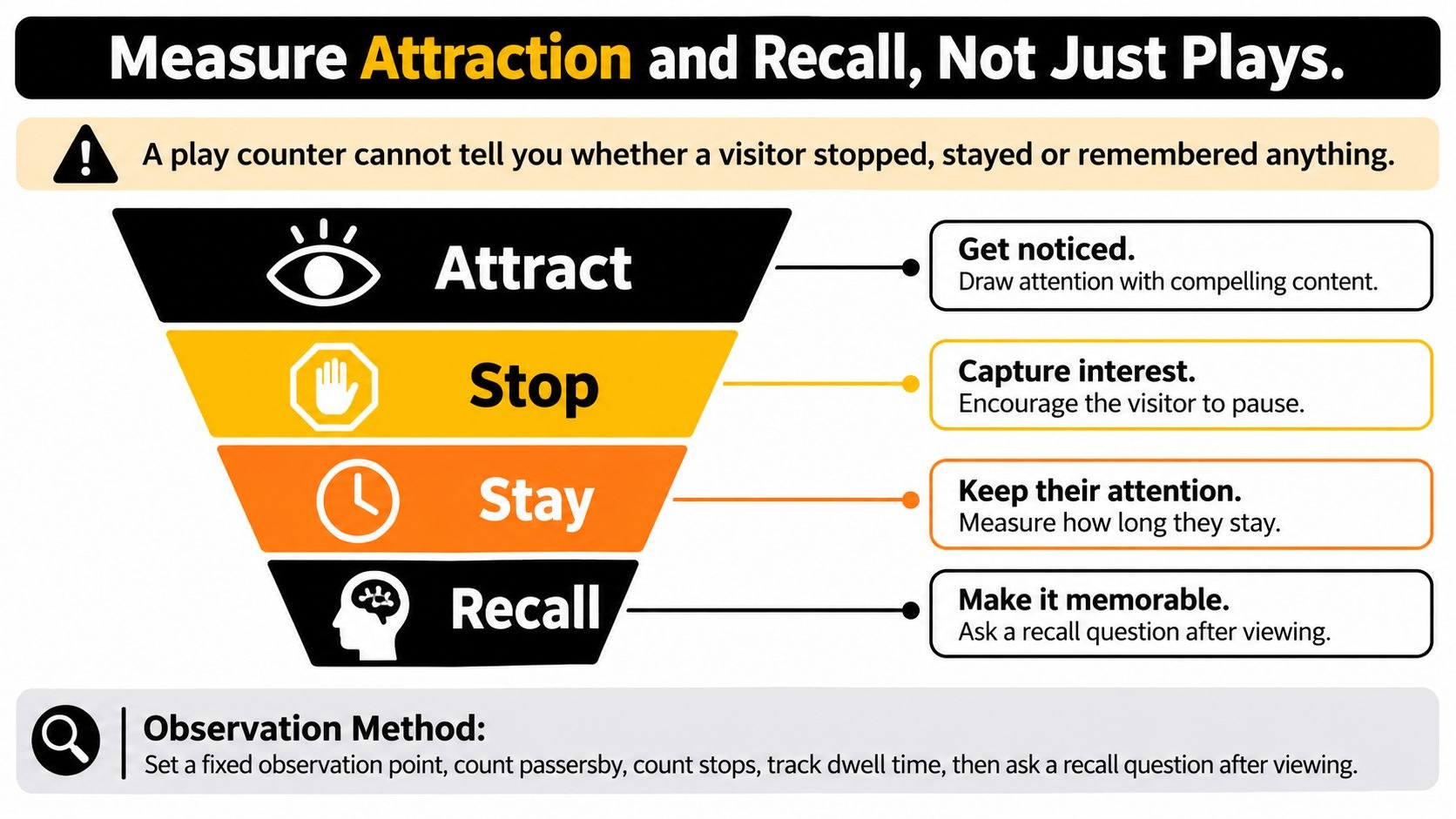
Player logs only tell you a file ran, so finding out whether anyone stopped or remembered anything means putting someone in the aisle to watch.
Museum evaluators have a method for exactly this, called tracking and timing. Serrell’s essay Paying More Attention to Paying Attention on informalscience.org describes it as unobtrusive observation of visitors, recording the “attraction rate for each exhibit,” the number of stops and the time spent at each stop. She sums up the video finding bluntly, too: “30% of visitors typically stop to look at a video and fewer stay for the whole thing.” I would borrow the method wholesale for a stand.
Mark a fixed observation zone in front of the screen and count passers, stops and viewing time without inviting anyone over, logging staff-led demos apart from people who stopped on their own. Agree what counts as a stop first, or one observer will count someone checking their phone while another only counts people clearly watching.
After a visit, ask the same open question every time (“what did the screen say the product does?” works) and score the answer against the intended message, without feeding the visitor your product vocabulary.
| Metric | How to measure it | What it tells you |
|---|---|---|
| Attraction rate | Stops divided by passers in the observation zone | Whether the screen catches attention at all |
| Mean dwell time | Average seconds watched before leaving | Whether the first seconds hold people |
| Message beat reach | Share of observed viewers still there at each key claim | Where the story loses people |
| Unaided recall | One open question after the visit, scored against the key message | Whether the message got through |
| Requests tagged to the video | Demo or meeting requests logged with a video tag in the CRM | Whether viewing was followed by a next step |
Put the limits next to the results when you report. Count people individually, because a crowd in front of a screen is several viewers; a playback log says nothing about whether anyone stayed to the end, and raw stop counts from stands with different traffic aren’t comparable anyway. A request tagged to the video shows an association; the video alone may not have caused it.
Keep the screen’s contribution separate from the event’s total result. For the wider event case I’d send people to PSW Events’ guide to experiential marketing ROI, mostly for its worked trade show ROI example and the part on attribution models; our video marketing ROI guide handles the video side. For the post-show review, Grou’s trade show pipeline audit is a 12-question scorecard that rates pre-show pipeline, on-stand conversion, post-show follow-up and ROI measurement.
Keep a captioned master and the cutdowns, tag each by objective, note which version played in each observation period, and report exposure and comprehension side by side. If people stopped but couldn’t say what the product does, I rework the message; if nobody stopped, I go after the opening frames.
Reuse footage within two days of the show
A 2011 Harvard Business Review article reported on a study of 1.25 million sales leads and response times. Firms that tried to contact a potential customer within an hour of a query “were nearly seven times as likely to qualify the lead” as those that tried even an hour later. That study looked at web inquiries, and badge scans may behave differently, so I read it as a direction. I still wouldn’t let a good booth conversation sit for a week.
That needs finished assets with an owner. If the editor gets first instructions after teardown, sales won’t have a clip when it counts.
Organizers move quickly here too. CES posted “A Look at CES 2025 Day 1” on its own channel on January 7, 2025, and in the frames I sampled it cuts between speakers on stage and two hosts on the show floor.
For individual leads, send the clip that matches the conversation. Someone who asked how your product connects to the system they already run gets that workflow, one specific next step, and a line from the staff member about what they said.
Outside one-to-one follow-up, these are the durations I’d start from, and I stretch them whenever an explanation needs the room.
- Social: a 15 to 30 second answer or demo built around one question.
- Landing page: a 60-second explainer with enough context for someone who wasn’t there.
- Sales deck: a 90-second demo a rep can pause and talk over.
Plan video production for social media around how each channel is actually watched, and check permissions and product claims before anything newly filmed goes public.
Every finished cut goes into an answer library, tagged by product, booth question and objective, with an approval status and a review date, so nobody sends an old interface or a claim legal never cleared. Put topic, orientation and version in every filename. Sales should only ever see approved cuts, kept in a separate folder from the working exports.
Cut the recap last, from footage already cleared for the answer clips, so it never holds up anyone’s follow-up.
Cost, timeline and partner choice
Get quotes on finished files first and filming hours second. Every screen adaptation, language version, animated element and cutdown needs editing and review. Send every producer the same deliverable list and technical specs so the quotes describe the same work. Our breakdown of corporate video production prices has typical ranges by video type.
Budget for the experts’ time as well as the crew’s. Even a short recording window needs prepared questions and someone on hand to approve the answers. If an expert reschedules, the edit slips.
Comparing producers, I start by asking for their silent loops and watching them muted, next to the polished films with music. Then I want it agreed who handles releases, captions and claim approvals, and the delivery spelled out (masters, publishing files, editable project files and who owns them). I also ask how reviews run in the weeks before the show. If you’re still building a shortlist, our guide to choosing an event video production company covers what else to ask.
Leave room for a re-cut after technical testing; a late change to the LED canvas can mean new layouts as well as new exports. Start the calendar from the screen-spec deadline, put the shoot after it, and write down revisions, approvers and file ownership before production starts.
Brief your first booth video before the next show
A one-page brief is enough to get a producer moving, even while the wider event strategy is still unsettled.
- One booth goal, such as demo requests or meeting bookings, plus who receives each request and what happens next.
- Two video types. For a demo-led stand that’s usually the silent loop and a staff-controlled demo.
- The native screen specifications, requested in writing from the exhibit house, with a named technical contact.
- A production window counted back from opening day, with review time reserved next to filming time.
- Names for who approves the work, who stores the masters and who maintains the answer library after the show.
Send that page and the screen list to whoever will produce the work at least eight weeks before opening day. Ask them to come back with the missing specs and dates before anyone touches the script.
Frequently asked questions
Aim for 15 to 30 seconds for the main booth loop. Most people catch it mid-cycle on their way past, so every few seconds has to make sense alone, with the product name and the key claim repeated in large captions. Museum research on exhibition videos found visitors watch less than half of a video on average, which argues for a short loop that restarts often over a long film.
Not the main loop. It should work fully on mute, with burned-in captions and big on-screen text, because hall noise drowns out speakers and a looping soundtrack wears on your own staff over a long day. Save sound for the staff-controlled demo, where someone chooses to play it, and for the interviews and recaps you send after the show.
No single standard exists. Ask the exhibit house or the venue's AV supplier, in writing, for each screen's native resolution, orientation, accepted container and codec, frame rate, maximum file size and playback method. A 55-inch signage panel like LG's 55UH5N-E is 3840 x 2160 at 16:9 and can hang in either orientation. With an LED wall, the pixel count depends on how many panels the builder uses, so even a big wall can end up a 2:1 canvas well under 4K. Get the pixel map before you edit.