Corporate Videography: 9 Real Examples and What They Teach
Nine real corporate videography examples from Google, LEGO, Xbox, IKEA and more, with what the camera does in each, plus costs, length and staffing.

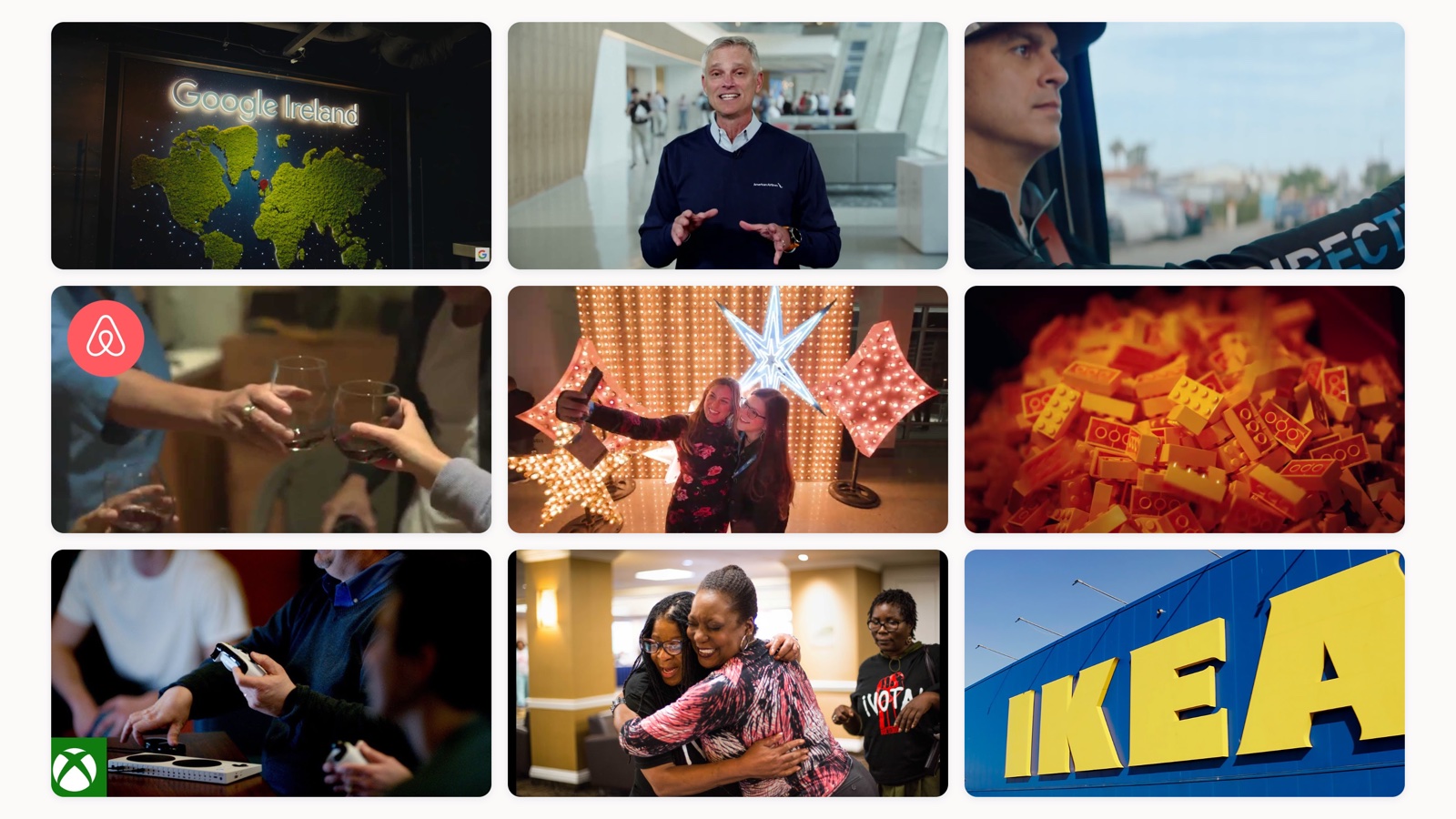
Corporate videography is the camera work behind a company’s videos: the person who lights the room, records clean sound and captures the footage, whether the job is a CEO message, a recruitment film or a tour of a factory floor. Corporate video production is the larger job wrapped around that shoot, from the strategy call and the script through the edit, the motion graphics and the final files. Most people searching for either term want both, so this guide starts with nine real examples and then covers how a shoot runs, how long the video should be and what it costs.
I have sat in plenty of kickoff calls where a marketing lead asks for “a corporate video” and means something completely different from the person next to them. One wants a two-minute brand film for the homepage. The other wants forty short clips for the training portal. Same two words, very different shoots. The examples below are the fastest way I know to settle that: find the one closest to what you need, and you have a shared reference for the crew, the format and the length before anyone books a camera.
9 corporate videography examples, and what the camera does in each
Every film below comes from the brand’s own YouTube channel, and each one is a different kind of corporate shoot. I picked them for the camera work. Each makes one clear decision about where the camera goes, or what it leaves out, and that decision is something you can lift straight into your own brief. If you are after brand films specifically, our list of corporate video examples goes deeper on that one format.
| # | Brand and film | Type of shoot | Length | What to borrow |
|---|---|---|---|---|
| 1 | Google, “Grow your Career at Google Dublin” | Recruitment | 2:30 | A different set for every interview |
| 2 | American Airlines, “A message from Robert Isom” | Leadership message | 1:26 | One camera, a real location, eyes on the lens |
| 3 | Slack, “Slack helps DIRECTV broadcast a better employee experience” | Customer story | 3:03 | Film the customer’s world instead of the software |
| 4 | Airbnb, “Kepa, Airbnb Host Stories” | Community story | 2:08 | Let detail shots carry the story |
| 5 | Adobe, “Adobe Summit 2025” | Event recap | 2:02 | Cover the stage, the floor and the evening |
| 6 | The LEGO Group, “LEGO Bricks In The Making” | Factory documentary | 8:32 | Wide shots, macro shots and diagrams for what the lens cannot see |
| 7 | Xbox, “Introducing the Xbox Adaptive Controller” | Product launch | 2:46 | Show the product in people’s hands before the pack shot |
| 8 | Starbucks, “Upstanders: Breaking the Prison Pipeline” | Short documentary | 4:31 | Follow real people and keep the logo out of the way |
| 9 | IKEA, “Sustainability Report FY23 Highlights” | Report highlights | 1:12 | Put each number on screen over footage of the thing it measures |
1. Google, “Grow your Career at Google Dublin”
A recruitment film has to sell a place as much as a job, and this one from Life at Google, the company’s careers channel, gives the rooms almost as much screen time as the people. It opens on a group of employees walking along the water in Dublin, then moves inside and stays there.
The smart move is the interview setup. Each speaker sits in a different corner of the office, with its own lamp, furniture and color, so the edit can cut between them without the film ever looking repetitive. Between interviews the camera picks up people working in lounges and meeting rooms, a climbing net shot from directly below, and a wide view of open hills. The name cards are small white pills that never fight the picture. If you are planning a careers video, this is the one to show your crew, and our roundup of the best recruitment videos has more in the same vein.
2. American Airlines, “A message from Robert Isom, American’s new CEO”
This is the cheapest format in the list and one of the hardest to get right. Robert Isom recorded it as he took over as CEO, and the whole film is a single setup: a medium shot of him standing in a bright, modern building, talking straight to the lens, while colleagues walk through the soft background behind him.
There are no cutaways, no B-roll and no graphics until the logo at the end. What carries it is the location and the lens. Shallow focus keeps him sharp and the building soft, and the people moving through the background make the place feel like a working office on a normal day. The branded sweater does the rest of the branding. If your CEO is comfortable on camera, this is a short shoot that lands an internal announcement better than a script read from behind a desk.
3. Slack, “Slack helps DIRECTV broadcast a better employee experience”
Software customer stories usually lean on screen recordings. Slack’s film about DIRECTV keeps the camera on DIRECTV instead: executives interviewed in offices with deep, out-of-focus backgrounds, and field technicians out on the road in branded vans.
Two choices stand out. The first is the frame itself: the film is shot in a wide cinema ratio, so the black bars above and below the picture are deliberate, and they give a software case study the feel of a short documentary. The second is the B-roll. A satellite in orbit, a dish against the sky, an overhead shot of a suburban street and a technician checking a phone in the van all show what DIRECTV’s people actually do, which makes everything said in the interviews easier to believe. A customer speaking on camera carries more weight than any claim you make about yourself, which is the thread running through our testimonial video examples.
4. Airbnb, “Kepa, Airbnb Host Stories”
This one is from 2014, and it still holds up as a lesson in observational filming. Rather than building the film around a sit-down interview, the camera follows the host through an ordinary day: answering the door, working in the garden in heavy gloves, putting the kettle on, sharing a drink with guests at the dinner table.
Most of the film is close, shallow-focus detail: poppies in the yard, succulents, the kettle on the gas ring, hands wrapped around a mug. Those shots do the storytelling, so nobody on screen has to explain what a good host is. The logo only appears on the final card. If you are making a customer or community film with a small crew, this approach suits you, because one operator with a fast lens and a full day at the location can capture most of it.
5. Adobe, “Adobe Summit 2025: Create, Orchestrate, Automate, Celebrate”
An event recap has one job: make the people who missed it wish they had gone. Adobe’s two-minute cut of its 2025 Summit in Las Vegas does that by covering three different worlds in one edit, the keynote stage, the expo floor and the evening.
On stage, the camera gets clean wide shots of the giant LED set and tight shots of speakers such as Adobe CEO Shantanu Narayen, with name cards. On the floor it moves handheld through crowded booths and product demos, and it catches the unexpected, including an attendee holding a cat on the show floor. Then it goes outside after dark for the evening games. That spread needs a shot list written moment by moment and usually more than one camera on site, so if you are briefing an event video crew, plan the coverage the way this film is cut.
6. The LEGO Group, “LEGO Bricks In The Making”
At eight and a half minutes this is the longest film here, and it earns the length because it follows a single process from raw plastic to the shop shelf. It is the clearest example I know of a factory film where the factory is the star.
The camera work switches between two scales. Symmetrical wide shots down long aisles of molding machines and automated storage racks show the size of the operation. Macro shots of bricks pouring into bins and robot arms handling crates show the precision. Where the lens cannot see inside a machine, the film cuts to clean blueprint-style diagrams, then back to real footage. If you have a manufacturing story to tell, this mix of wide shots, macro shots and simple motion graphics is the template.
7. Xbox, “Introducing the Xbox Adaptive Controller”
A product launch video usually opens on a pack shot. This one opens on people. The controller appears early, but always in someone’s hands, and the clean product shot on a white background only arrives in the last seconds.
The interviews with gamers are lit simply against plain or softly blurred backgrounds, and they are intercut with very tight close-ups of hands on buttons, which is exactly where this product matters. Scenes at Craig Hospital, one of the partners Microsoft designed the controller with, show the setting it was built for. By the time the pack shot appears, the viewer already understands why the product exists, so the ending lands as a payoff. Our guide to the product launch video covers how to structure the rest of a launch around a film like this.
8. Starbucks, “Upstanders: Breaking the Prison Pipeline”
Upstanders was a Starbucks series of short documentaries about people improving their communities, and this episode is a good reminder that a corporate film does not have to be about the company. Its subject is A New Way of Life, a reentry program for women coming home from prison.
The camera work is straight documentary. It moves through a prison corridor, old family photographs and an ordinary kitchen, then sits close on Carolyn Robinson, a resident of the program, often in profile, through the interview. Handheld shots follow people from behind as they walk into buildings instead of staging an arrival, and the film ends at a graduation, with a graduate in cap and gown hugging family in the crowd. Nothing is lit to look like an ad. If your company funds work in the community, this is the register to aim for: film the people doing the work and keep your logo in the credits.
9. IKEA, “IKEA Sustainability Report FY23 Highlights”
Sustainability reports are some of the longest documents a company publishes, and IKEA turned one into a 72-second film. There is no presenter. Every line appears as on-screen text over footage of the thing it describes, from solar panels on a store roof to a production line recycling fiberboard.
The structure is simple to copy. Each claim gets its own shot: the line on the climate footprint sits over the blue store facade, bio-based glue gets a close-up of the machinery, and a tableware range made from ceramic production waste gets a set table. The long-term targets, 2030, 2032 and 2050, get full-screen type over the sky. Because the words are burned into the picture, the film works muted in a social feed. If you publish an annual or impact report, a short cut like this is the version most people will actually see.
Corporate videography and corporate video production are not the same thing
Videography is the filming craft. A corporate videographer runs the camera, sets the lighting, records the audio and handles the technical side of a shoot on location. Production is everything around that shoot. It starts before anyone touches a camera, with the strategy and the script, and it keeps going long after the shoot wraps, all the way through the edit.
Here is why the difference matters for your money. Hire a videographer and you get footage. Good footage, if they are good. What you do not automatically get is a story, a script, an editor who understands your brand, or someone deciding whether this should be a live shoot at all instead of animation. Look back at the nine examples: in every one, the memorable part is a decision made before the shoot, about where the camera goes and what it ignores. Good cameras cost little and are everywhere now. Good judgment about what to point them at is still rare.
What companies actually use corporate video for
Corporate video splits into two buckets that behave very differently. Internal video talks to your own people: onboarding, product training, all-hands recaps, leadership messages like the American Airlines film above, and recruitment films that show what the place is really like. External video talks to the market: brand films, product demos, customer stories, event coverage and social ads.
Companies keep funding both because video is now the default way people take in information at work. HubSpot’s marketing research puts short-form video as the single most-used content format among marketers, and Google’s research on B2B buyers has long shown that most of them watch video while researching a purchase. Your buyers and your new hires already expect to learn from a screen. The only open question is whether your video is any good.
A few workhorses are worth knowing. Customer and employee testimonial videos carry more weight than any claim you make about yourself, because a real person is saying it. Product demos shorten sales cycles by answering the questions your reps repeat all day. Event coverage turns one conference into a quarter of content. For the full catalog, we keep a running list of the types of corporate video.
How a corporate video actually gets made
Every corporate video, from a thirty-second social cut to a two-day shoot, moves through three stages. Skip any one of them and you can see it in the result.
Pre-production is the planning: the strategy call, the script or outline, the shot list, casting, the location, the schedule, and the dull logistics like permits and building access. It is the least glamorous stage and the one that decides the outcome. I have watched a beautifully shot video fall apart in the edit because nobody agreed on the message before the shoot. You cannot fix a fuzzy idea with a nicer lens.
Production is the shoot: crew, lighting, sound, talent, and a director keeping every take pointed at the plan. Corporate shoots run fast, often inside a working office where you have the room for four hours and not a minute longer. Miss a shot and you either cut it or pay to come back for it.
Post-production is the edit, and it is where the story really gets built. The editor picks the takes, shapes the pacing, adds motion graphics and titles, colors the footage and mixes the sound. Then you version it: a wide cut for the site, a square cut for the feed, a vertical cut for stories, captions on all of them. Our video production checklist lays out what to lock at each stage so nothing slips through. If you have never sat through a shoot, the breakdown below walks through the pre-production stage.
How long should a corporate video be
Shorter than you think, unless the subject earns more. The instinct on corporate projects is to fit everything in, and the result is a four-minute video that nobody finishes.
The data leans hard toward the short version. Wistia looked at more than fourteen million videos and found engagement holds highest under a minute, then eases as length grows. Vidyard’s business video benchmark found that around two-thirds of viewers finish a video when it runs under sixty seconds, and that most business videos now land at two minutes or less. The nine examples above run from 72 seconds for IKEA’s report to eight and a half minutes for LEGO’s factory film, and both lengths are right for the job. A message or a recap should be short. A process film that teaches something can run long, because every minute shows the viewer something new.
My rule of thumb: one video, one idea. If you have three messages, you have three videos, not one long one.
Wistia analyzed more than 14 million videos across 100,000+ businesses. Engagement is highest on videos under a minute and eases as length grows, which is the case for keeping most corporate video short.
Source: Wistia State of Video Report
What corporate videography costs
There is no single price, and anyone who quotes one without asking questions is guessing. Corporate video is usually priced by the finished minute, and the range is wide. As an indication of the market, not our prices, most business and training content lands somewhere between $1,000 and $10,000 per finished minute, with animation and heavy motion graphics at the top. A single talking-head message shot in your own office, like the American Airlines example, sits near the bottom. A multi-location documentary with a crew, aerial shots and a long edit, like the LEGO or Starbucks films, sits near the top, or past it.
What moves the number: how many shoot days, crew size, the amount of motion graphics, licensed music, professional talent versus your own staff, and how many final versions you need. Two shoot days cost roughly twice one. For a full breakdown of the drivers, we wrote a guide to corporate video pricing.
The mistake I see most often is anchoring on the day rate and forgetting post. The edit on a polished two-minute film can take longer than the shoot did. Ask for the all-in number, versions included, before you sign.
What separates good corporate video from forgettable corporate video
Most corporate video is forgettable for one reason: it tries to say everything, so it says nothing. The good ones pick a single idea and commit to it. Each of the nine examples could be summed up in one sentence, and you could guess that sentence from the camera work alone.
Three things separate the work that lands, and the camera is not one of them. The first is a real idea, decided in pre-production and written down, not discovered at 2am in the edit. The second is people who can actually talk on camera, which usually means casting from inside the company instead of defaulting to whichever executive outranks everyone. The last is an editor with taste and enough hours to find the story hiding in the footage.
I will own a mistake here. Early on we let a client cram nine product features into a ninety-second explainer, because they were paying and they insisted. It tested badly. Viewers dropped off around the third feature and never reached the call to action. Now we push back in the first call and ask one question: what is the single thing a viewer should remember, and what are we willing to cut to protect it. That question has rescued more videos than any piece of gear.
In-house, freelancer, or an embedded team
How you resource corporate video comes down to how often you need it. For a one-off, a freelance videographer or a production company is the right call. You brief them, they deliver, you part ways. For steady output, month after month, the math shifts, and you start weighing whether to build the capability inside.
A freelancer is flexible and knows their craft, but you become the producer and the brand guardian, and every new hire relearns your brand from scratch. An in-house team knows your brand cold and is always on hand, though it is a real commitment to staff, and one editor is not also a motion designer. If you are weighing that build, our piece on building an in-house creative team is worth reading before you post the role.
There is a middle option, which is where I sit. Moonb works as an embedded creative team: a dedicated group that learns your brand once and produces video, motion, animation and design as an ongoing partnership, so you do not have to hire and manage each role yourself. I work there, so weigh my view accordingly. It fits companies that need creative every month and do not want to build the whole department from zero.
Whatever you choose, the same rule holds. Decide the one thing your video has to say, protect that idea from the first call to the final export, and keep it shorter than feels comfortable. The gear has never been better or more available. The thinking is still the hard part, and it is still the thing worth paying for.
Frequently asked questions
For a straightforward live-action piece, plan on three to six weeks from kickoff to final cut: a week or two of pre-production, a shoot day or two, then two to three weeks of editing and revisions. Animation and motion-graphics projects run longer, often six to ten weeks, because the whole thing is built in post. The biggest variable is your own review speed. Slow feedback rounds stretch a timeline more than anything on the production side.
Yes, though it looks different. You will not script the answers, but you should write the questions and a rough outline of the story you want them to tell. Without it you get four people answering the same question five ways and an editor with no spine to build around. A one-page interview guide, agreed before the shoot, is the difference between a tight three-minute story and an hour of footage you cannot use.
Often, yes, and it can look great, but walk the space first. The two things that ruin office shoots are sound and light: hard floors and HVAC hum wreck audio, and mixed window light plus fluorescent ceilings fight the camera. A good crew brings its own lighting, picks the quietest room, and dampens reflective surfaces. Clear it with facilities and anyone who might appear in the background before the day, not on it.



