How to launch a video podcast for your brand
A practical guide to video podcast production for brands: room, cameras, audio and light, batch recording, remote guests, the edit, social clips, publishing, weekly effort, a two-level starter kit and a season calendar.

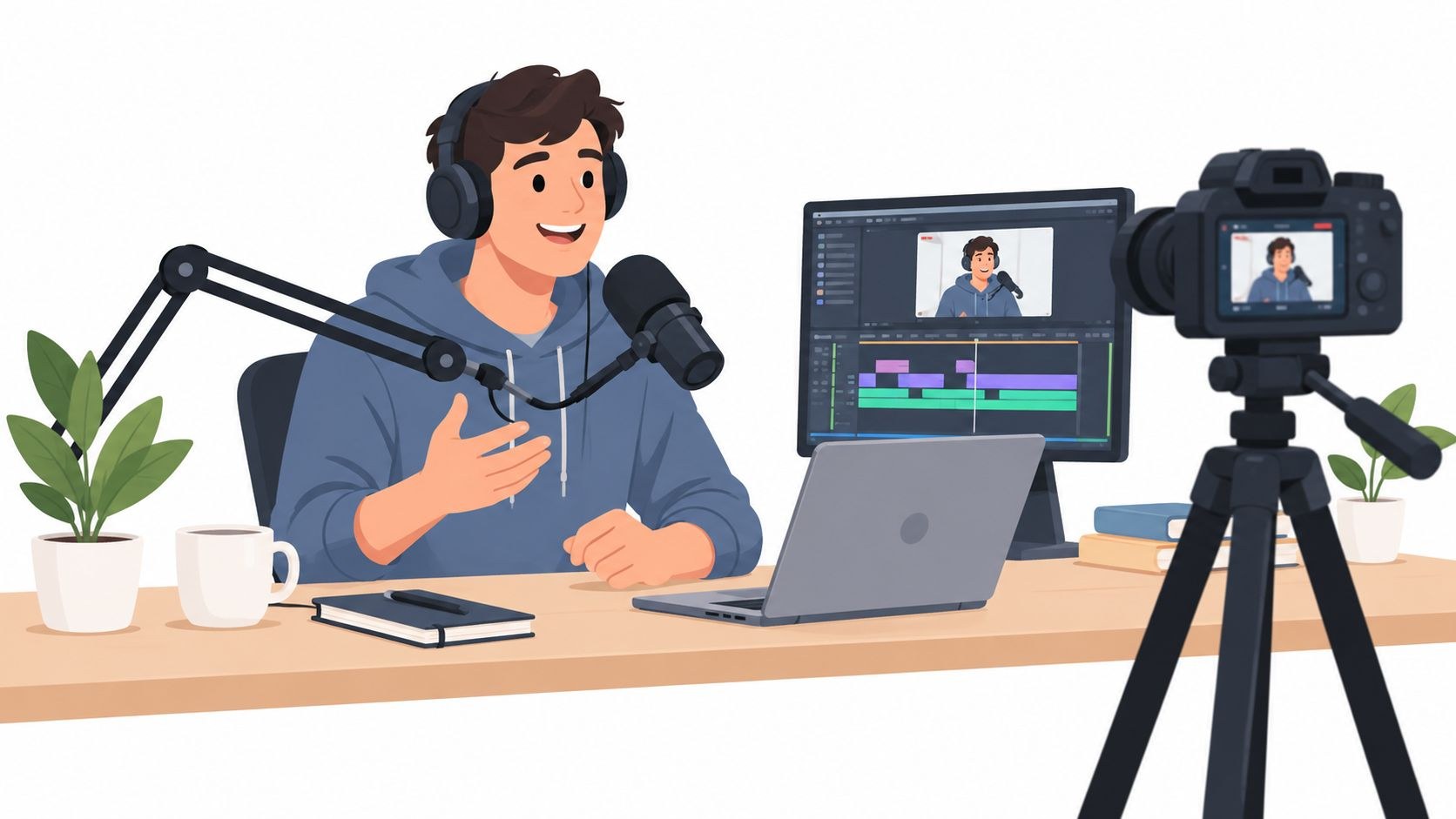
To launch a video podcast for your brand, start with one quiet room: a camera on each speaker, a dynamic microphone per voice, soft light. Record several episodes on a single batch day. Cut each recording into a full video episode, an audio version and a handful of short clips. Then publish the video to YouTube, and use a podcast host that reaches Spotify and Apple Podcasts.
Long recorded conversations are a steady part of the work our editors at Moonb get handed, and each recording has to come back as a full episode plus a stack of vertical clips. The shows I’ve seen make it past episode six all had somebody plan the production run before anyone bought gear. The ones that stalled usually started with the microphones.
Plan the show as a weekly production run
Every week, a brand video podcast ships a list of things. One episode means a full video, an audio file for the podcast feeds, three to five short clips, a thumbnail, captions, a description with chapters, and posts pointing people back to the show. Give each of those an owner and a due date before the first recording.
People already watch and listen. Edison Research’s Infinite Dial 2026 found that 80% of Americans age 12 and older have ever listened to or watched a podcast, and 57% have done both. Edison’s Megan Lazovick put it this way: “Video isn’t replacing podcast audio. It’s expanding the tent.” Plenty of your audience will hear the show without ever seeing it, so don’t let a point depend on something only the viewers get.
Before anyone opens a gear catalog, fill one page: who the show is for, the format (solo, host plus guest, or a panel), the target length and the release rhythm. Under that, list what each episode must produce and write the name of the one person who approves the final cut. If you are not sure what the show is for in business terms, start with our video marketing strategy guide and come back.
Set up the room, cameras, audio and lighting
Room first. A small room with a rug, curtains and a sofa beats a glass meeting room with echo and a loud air vent, every time, no matter how good the glass room looks on a mood board. Clap once and listen. If the clap rings, add soft surfaces before you add cameras.
Audio matters more than picture. Viewers forgive a soft image far sooner than a voice that sounds like it came out of a stairwell. Every speaker gets their own dynamic microphone, about a hand’s width from the mouth and slightly off axis so plosives don’t pop, and every voice goes to its own track; that way the editor can fix one person’s cough without touching the other person’s answer. If you record WAV, Apple’s audio requirements list 24-bit at 48 kHz among the accepted formats, which is also a comfortable setting for video.
The classic camera setup is one wide shot plus one tight shot per speaker. That is what lets an editor cut on reactions without jump cuts. A solo host can start with a single camera at eye level and be fine. Whatever you buy, make sure it records for a full episode without stopping or overheating, and test that a week before the batch day.
Light faces with one large soft key per person and a little fill. Keep bright windows out of the back of the frame and don’t mix daylight with warm bulbs. Then check the frame on a phone. If the eyes disappear at that size, move the light or the camera.
You will rebuild this set every time, so make it easy. Tape the tripod, chair and microphone positions, and save exposure and white balance as camera presets. With four or five episodes back to back, those marks are the reason the first and the last episode look like the same show. I’d run through our video production checklist the day before, too.
Record several episodes in one day
A small team keeps a weekly show alive by batching. The host prepares once, the room gets set up once, and one good recording day covers every release until the next batch day.
Plan around the host’s energy. Four or five conversations is a full day for most people, and the last one always sounds more tired than the first unless the breaks are real breaks. I put a 30-minute reset between episodes, enough for a fresh drink and a check of batteries, cards and frame.
Guests get everything in advance: topic, format, arrival time, what to wear (solid colors; fine stripes shimmer on camera) and the release form. Write a short outline for each conversation. Then let the talk wander a bit; the outline is there for when the host gets lost, and reading from it on camera looks stiff. At the top of each episode, say the episode number and the guest’s name on camera, clap once for sync, and record ten seconds of silent room tone for the audio edit.
Remote guests
Remote guests need their own prep. Headphones on, a quiet room, a window or soft lamp in front of them, camera at eye level. The safest setup is a double-ender, where each side records its own audio and video locally and the files get joined in the edit, so a bad connection only spoils the live call. Many browser recording tools do this automatically. Keep the call recording as a backup anyway.
If the remote guest comes in through a podcast recorder, check how it handles echo. Zoom’s PodTrak P4next, for example, brings in two remote guests over USB, Bluetooth (with Zoom’s BTA-2 adapter) or its TRRS input, and its built-in mix-minus “removes echo and feedback automatically.”
Disclosures on a brand show
Employees and partners talking about the brand’s products on the brand’s own show is an endorsement question, and most teams forget that. The FTC’s Endorsement Guides FAQ says connections “could be based instead on things like friendship, family, or employment relationships,” and for YouTube it warns that a disclosure in the description is “not enough on its own.” Say it in the episode. And check every short clip carries it too, because a clip travels without its description.
The edit workflow, from multicam to master
The edit starts before anyone opens the timeline. When the batch day ends, the editor should get folders named by episode and camera, the separate audio tracks, the outline and a short list of moments the host wants kept. I care about this more with batching, because five episodes arrive on the editor’s drive on the same day.
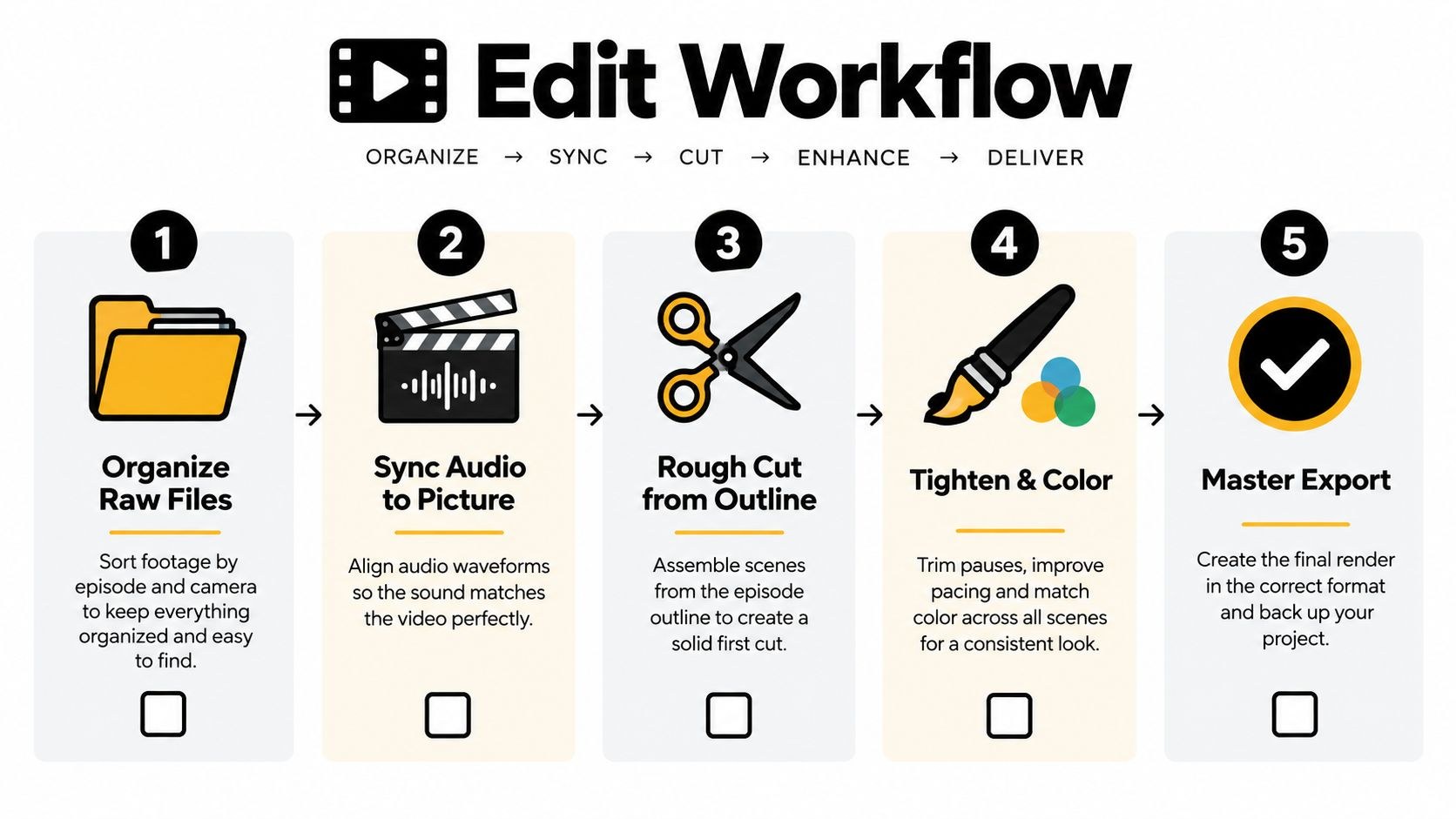
Organize and sync first. One multicam sequence per episode, audio matched to picture by timecode, the clap or the waveforms, and a duplicate of the project before a single cut. On long shoots we edit from proxies and leave the camera originals alone. Making proxies adds a step at ingest. I still won’t do a four-camera podcast without them, because otherwise the playback stutters for hours.
The first pass is structure. Lay the conversation against the outline, cut the false starts and repeated answers, and leave some air for reactions, since a conversation with every pause trimmed out sounds rushed and a bit nervous. The second pass is coverage: switch angles when something changes in the conversation, and drop in a product shot or a diagram only when it explains the point faster than another face would.
Audio gets its own pass. Take out handling noise and long dead air, apply gentle noise reduction, then EQ and light compression until both voices sit at the same level. Go too far with denoising and speech turns metallic, and clipped audio never comes back clean, whatever the plugin promises. Listen on headphones, laptop speakers and a phone.
Get a transcript early. Running the episode through a tool that can turn an MP4 into text lets the producer search for quotes and write chapters without scrubbing through the whole recording, and clip hunting gets faster too.
Every timeline ends in three exports: the full video master, the audio-only mix for the podcast feeds, and the clip selects for the vertical edit. Before that, match color across cameras, watch the whole thing once without stopping, name the files consistently and back up the project. Our guide to video editing has more on the handoff between editor and reviewer.
Cut each episode into short clips for social
What annoys me most here is the random two minutes from the middle, cropped to vertical and posted. That is why so many brand podcast clips sit at no views. A long conversation holds several good moments, but a clip needs its own opening and a single point.
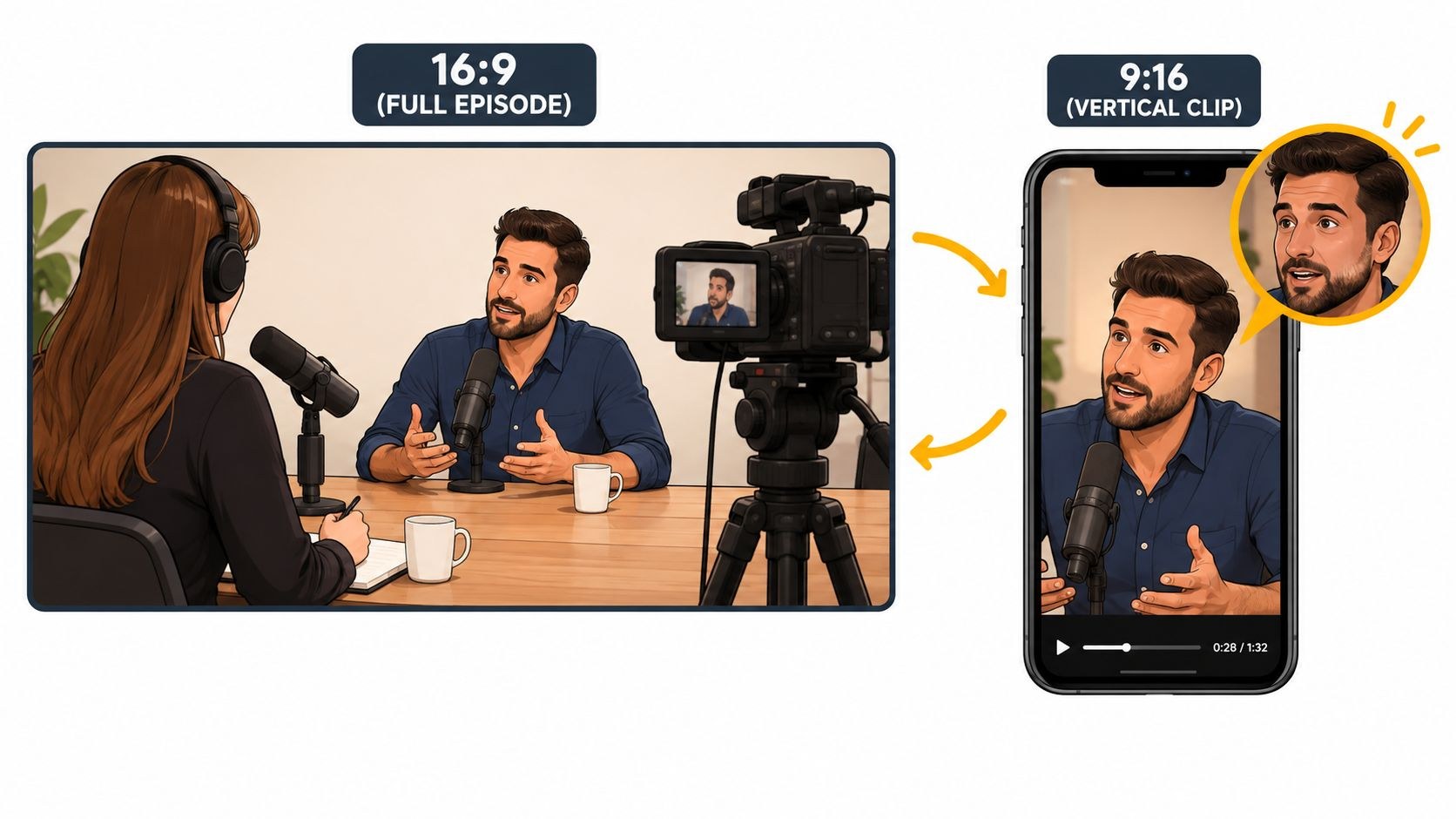
Mark candidates while you edit. A direct answer to a common question, a strong opinion, a short story with an ending, a clear explanation of something customers keep asking about. Shape each excerpt around one idea, and when it needs context, add a line of on-screen text to set it up.
Reframe every clip as its own composition, with faces, products and captions inside the central safe area so the platform buttons don’t cover them (the exact sizes are in my vertical video dimensions guide). Burn the captions in so the clip works with the sound off, and have a person check names, product terms and punctuation.
I aim for three to five clips per episode and spread them across the week. You could cut twenty from most conversations, but dumping them all on launch day mostly buries the good ones. StreamGen’s guide to repurposing video into short-form clips is written for streamers, and its parts on clipping and vertical framing apply to a podcast as well. Where the clips go depends on your audience, and our comparison of YouTube Shorts and TikTok lays out how the two differ.
Publish to YouTube, Spotify and Apple Podcasts
YouTube, Spotify and Apple each want the episode delivered a little differently, so check their specs before you export the first master.
YouTube
YouTube’s Create a podcast in YouTube Studio help page explains that “a podcast show is a playlist, and podcast episodes are videos in that playlist,” and the playlist should hold only full-length episodes, in the order they should be watched. You create the podcast in YouTube Studio with a title, description and a square podcast thumbnail, then upload the episode videos into it. Episodes can then show up in YouTube Music, though the same page notes that “Shorts created to support your podcast will not appear in YouTube Music.”
In select countries YouTube can also pull episodes from an RSS feed. The RSS delivery help page says it will “use your podcast’s show art to create a static-image video” for each episode. Fine for an audio-first show. If you went to the trouble of filming, upload the real video episodes directly. That page also reminds you to declare host-read promotions, sponsorships and endorsements as branded content.
YouTube’s own walkthrough shows the podcast setup in Studio, square thumbnail included:
This is the platform I’d set up first. Edison Research’s Infinite Dial 2025 release cites Edison Podcast Metrics showing YouTube as the service used most often to listen to podcasts, by 33% of U.S. weekly podcast listeners. So write titles that say what the episode is about, add chapters that match the actual conversation, and design a thumbnail that still reads when it’s tiny; the testing side is in our guide to optimizing video thumbnails.
Spotify
Spotify takes video episodes two ways. You can host with Spotify for Creators, or use a host that distributes video to Spotify; its help page for shows not hosted with Spotify lists Audioboom, Audiomeans, Buzzsprout, Flightcast, Libsyn, Podigee and Podspace. If your host isn’t on that list, you can still replace an audio episode with video inside Spotify for Creators, but those video episodes only play on Spotify.
Spotify’s video specs recommend an MP4 with H.264 video, 1080p or higher, in a 16:9 widescreen frame, and the audio and video tracks must be the same duration. Some Spotify apps letterbox or pillarbox other aspect ratios, so the 16:9 master goes to Spotify and vertical stays with the clips.
Spotify’s tutorial on publishing audio and video episodes is from 2024 and still points viewers to podcasters.spotify.com, so a few screens in today’s Spotify for Creators may look different:
Apple Podcasts
Apple now prefers HLS video. Its guide to publishing video says to work with a hosting provider that supports video on Apple Podcasts, generate an API key in Apple Podcasts Connect and share it with that host. With HLS, listeners get one show page and can switch between video and audio-only mid-episode, and in Analytics “video and audio consumption are grouped together.” If your host doesn’t support HLS yet, Apple’s RSS video page still accepts MOV, MP4 and M4V files, published to a separate video feed next to the audio show.
Which is why I’d pick the podcast host last, after checking what it supports on all three. With the wrong one, every release means uploading to each platform by hand.
The realistic weekly effort
Effort depends on episode length, the number of speakers, how many clips you want and how many people sign off. For a weekly show with one 30 to 45 minute, two-person episode, three to five clips and light graphics, I’d start with the numbers below and replace them with real times from your pilot.
| Job | Owner | What it covers | Time per episode (starting estimate) |
|---|---|---|---|
| Planning | Producer | Topic, outline, guest booking, release forms | 2 to 3 hours |
| Recording | Host, producer, camera operator | Share of a four- or five-episode batch day, setup and reset | 2 to 3 hours each |
| Edit and mix | Editor | Sync, structure pass, coverage pass, audio pass, color | 6 to 10 hours |
| Clips | Editor or social designer | Select, reframe to 9:16, captions, a hook line | 3 to 5 hours |
| Publishing | Producer | Thumbnail, title, description, chapters, uploads, scheduling | 1 to 2 hours |
| Review | Approver | One review round on the episode and the clips | 1 hour |
Review is the line that grows after launch. Nobody agreed what finished means, so approvals drag on and clips get re-cut until the release slips. Name one approver with a fixed review window, and keep the season’s look simple enough to repeat every week. And if the team can’t protect these hours, go to every two weeks before the show starts. I’d much rather see a steady fortnightly show than a weekly one that starts skipping weeks.
A starter kit at two levels, and a season calendar
The first kit is for a solo host or two people in one room. The second is for a regular two to four person show with a proper multicam edit. Most gear is named generically because any decent model will do; the few named products are examples, with specs from the maker’s page.
| Item | Starter kit | Studio kit |
|---|---|---|
| Cameras | One camera or a 4K webcam at eye level, or a recent phone on a tripod | A wide camera plus one tight camera per speaker, each able to record a full episode without stopping |
| Microphones | One USB dynamic mic per speaker; the Shure MV7+ has both USB-C and XLR outputs, so it moves up to the studio kit later | One broadcast dynamic mic per speaker on a boom arm |
| Recorder or interface | A computer recording each USB mic, or a compact recorder such as the Zoom PodTrak P4next (four XLR inputs, a stereo mix plus individual channels saved to microSD) | A podcast console such as the RØDECaster Pro II (four combo inputs, multitrack or stereo recording to microSD, USB storage or a computer) |
| Headphones | Closed-back headphones for everyone at the table | Closed-back headphones per person, each with its own volume control |
| Lighting | One large soft key light, daylight balanced | A soft key per speaker, fill, and a background light for depth |
| Room | A quiet room with soft furnishings and nothing bright behind the host | A treated room or set kept for the show, with taped marks for chairs, mics and tripods |
| Remote guests | A browser recording tool that records each side locally | The same, plus a mix-minus feed through the console so the remote guest hears no echo |
| Storage | Fast cards plus one backup drive | Cards per camera, a backup drive and a second copy offsite or in the cloud |
| Crew on the day | Host plus one producer | Host, producer and one person watching cameras and levels |
RØDE also sells the RØDECaster Pro II in a bundle with four PodMic dynamic microphones, four sets of headphones and four studio arms.
The calendar covers a 12-week season of ten weekly episodes, recorded on two batch days and released weekly from week 6, so the team always has finished episodes in the bank. Episodes 8 to 10 go out in the three weeks after the calendar ends, while season two is being booked.
| Week | Production work | Release |
|---|---|---|
| 1 | Pick the audience, format, host, look and approver. Write the one-page show brief | |
| 2 | Book guests for both batch days. Test the room and gear, set camera presets, tape marks | |
| 3 | Record and edit a pilot. Time every job and fix the handoff | |
| 4 | Batch day 1: record episodes 1 to 5. Design artwork, the square podcast thumbnail and the trailer | |
| 5 | Edit episodes 1 to 3 and their clips. Set up the host, YouTube podcast playlist, Spotify and Apple. Release the trailer once episode 3 is approved | Trailer |
| 6 | Edit episodes 4 and 5. Schedule clips | Episode 1 |
| 7 | Review the first numbers and comments. Prep outlines for batch day 2 | Episode 2 |
| 8 | Batch day 2: record episodes 6 to 10 | Episode 3 |
| 9 | Edit episodes 6 to 8 and their clips | Episode 4 |
| 10 | Edit episodes 9 and 10. Mid-season review of topics, thumbnails and workload | Episode 5 |
| 11 | Finish the remaining clips. Book guests for season two | Episode 6 |
| 12 | Season review and the plan for season two | Episode 7 |
Run all of it from one shared sheet: recording dates, guest confirmations, edit deadlines, reviews, publish dates. Our free content calendar template does the job. If you also want to turn an episode’s ideas into written posts, Narrareach’s 90-day content repurposing playbook is aimed at newsletter writers and maps one piece across LinkedIn, Medium and X. For the vertical edit itself, see our guide to short-form video for Reels.
Frequently asked questions
Yes, as long as you can hold one release day across all three. Full video episodes go into a YouTube podcast playlist, and a podcast host that distributes video to Spotify and Apple Podcasts covers both with one upload. Release everywhere the same day and point your clips at whichever platform your audience already favors, so the early comments and listens aren't split across a week.
Have at least three finished episodes and a trailer before anything goes public. With that buffer, a sick guest or a slow approval doesn't break the weekly schedule, and people who find the show early have more than one episode to watch. A single batch day of four or five recordings usually covers the launch and the first month.
For a solo-host show, yes: a single camera, a USB microphone and a simple edit, with clips kept to two or three per episode. Once there are guests and several cameras, it's more than one person's job. Split it into a host, a producer who handles guests and publishing, and an editor. The edit and the clips eat the most hours, so hand those off first.



