13 Software Demo Videos That Sell the Product
Thirteen real software demo videos, embedded and grouped by style, with practical notes on picking a format and getting the length right.

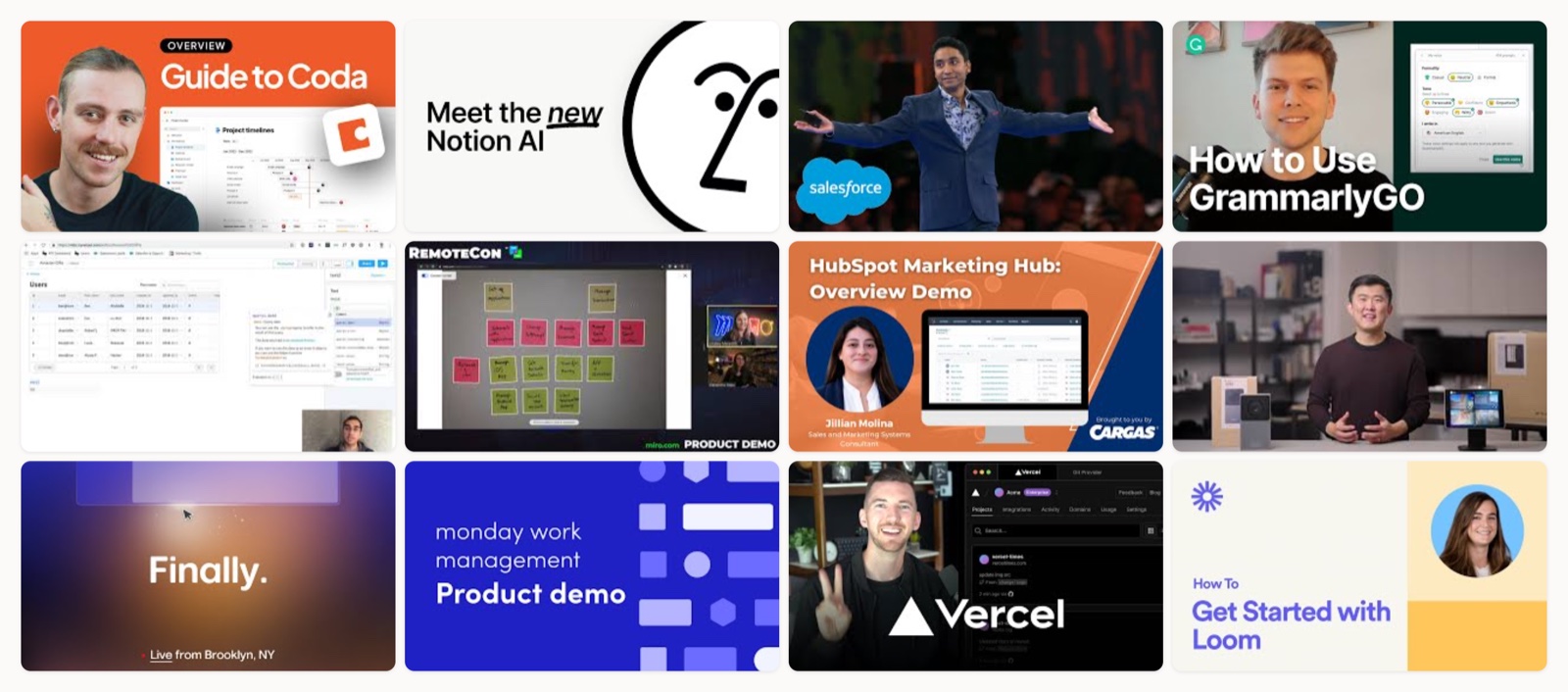
I have cut enough software demos to know the gap between one that gets watched and one that gets closed three seconds in. The demos that land do the same thing early, which is show the product doing a real job, on screen, before they explain anything about it. The good ones open on the outcome and hold to a single takeaway. Length is the next decision, and you set it by how much the viewer already knows.
Below are 13 real software demos from companies like Notion, Salesforce, Retool and Loom, each one embedded so you can watch it and grouped by the style you are actually choosing between. After the gallery I get into how to pick a style, what to put in the brief, and the mistakes I see most. If you want the broader category first, our roundup of product demo videos is a good companion piece.
What makes a software demo video work
A software demo video shows your product in use so a buyer can picture themselves using it. In my experience that is the whole job. Gartner Digital Markets’ 2024 Global Software Buyer Trends Survey put product demonstrations among the content software buyers lean on most before they commit, so the video earns a real place in the evaluation rather than sitting on the marketing page.
Three things separate the demos that convert from the ones that get skipped. They open with the pain the product removes instead of a logo animation. They show one clear outcome rather than touring every feature, and they end on one action, a signup or a booked call, so the viewer knows the next step. Everything after that (the style and the length) is a choice you make in service of those three.
The four styles of software demo video
Most software demos fall into one of four styles, and the right one depends on your product and your audience.
Screen-capture walkthrough (screencast). You record the real interface and narrate it. This is the fastest format to produce and the most credible for technical buyers, because they are watching the actual product rather than an illustration of it. Salesforce, Retool and Vercel all use it.
Animated or motion-graphics launch film. Instead of the raw UI, you abstract the product into clean 2D or 3D motion. This suits launches and hard-to-show ideas, like an AI feature, where a literal screen recording would confuse people. Notion’s AI film is a strong example.
Live or presenter-led demo. A person walks the product in real time, often at an event or in a webinar. It fits exploratory, collaborative products that are better roamed around than summarized, and it works for audiences already deep in evaluation. Miro and Arc lean on this.
Screen plus webcam. You combine the screen recording with a presenter on camera for warmth and a human voice. It is the natural choice for onboarding and personal, async explanations. Loom, unsurprisingly, demos itself this way.
If you already know you want the animated route, our notes on SaaS product demo video go deeper on that specific format.
How long should a software demo video be?
I match length to awareness. For a cold audience meeting the product for the first time, keep the public cut to one or two minutes and use it to spark interest. For buyers who are already evaluating and want detail, a five-minute-plus walkthrough is fair game, because they have opted in to the depth.
Wistia’s State of Video research keeps showing engagement fall as videos get longer, and Vidyard’s benchmark data points the same way. Most business videos run short for a reason. My rule of thumb is a tight cut for anything public and a longer recorded “canned” demo kept on hand for sales, so a rep is not rebuilding the same walkthrough live on every call. If you want the sales-side detail, SaaS demo best practices covers the canned-demo workflow well.
13 software demo video examples worth studying
1. Coda: What is Coda?
Coda has the hardest pitch on this list, a document that also behaves like a spreadsheet and an app, and the demo solves it by showing one surface become all three on screen. That is the move worth stealing. When your category is fuzzy, do not describe it, show one familiar thing turning into the new thing so the viewer’s brain has a handhold.
2. Notion: Introducing Notion AI
AI features are the easiest thing to demo badly, all glowing orbs and vague promises. Notion grounds it in specific moments, like searching across Notion, Slack and Drive from one bar, so the abstraction becomes something you can picture doing at your desk. Steal the discipline of tying every AI claim to a concrete in-product action.
3. Salesforce: Einstein assistant demo
This is the plain enterprise demo, a straight screen recording with a rep talking over it, and it works precisely because it wastes no time. There is no film-school flourish, just the product doing the thing with a light nudge toward why you would want it. When your buyer is technical and already comparing options, this bare format often beats the glossy one.
4. Grammarly: Getting started with GrammarlyGO
Grammarly demos its generative writing inside the real apps people already write in, so you see the value in the exact place you would feel it rather than in a sandbox. The takeaway is to run your demo in the messy real context your users live in, because that is where the “oh, I need this” moment actually fires.
5. Retool: The four-minute build demo
For a developer tool, watching someone build a working internal app from a database in real time beats any animation you could commission. Retool lets the build itself carry the argument. If your product makes something, film it being made, and leave it uncut enough that a skeptic believes what they are seeing.
6. Miro: Live product walkthrough
An infinite canvas is hard to script into a tight 90-second cut, so Miro runs it as a live, presenter-led walkthrough where the roaming is the point. This is the aware-audience format, longer and looser, and better suited to a product people need to see explored than boiled down.
7. HubSpot: Marketing Hub overview
Broad multi-feature platforms drown viewers when you try to show everything, so HubSpot organizes this one by workflow and signposts each section as it goes. Group a large product into three or four clear jobs and label them, and the viewer always knows where they are in the tour.
8. Intercom: Product demo
Intercom demos its support and AI-agent platform through real customer-conversation scenarios instead of a capability list, so you watch the product actually doing its job. Framing the demo inside a believable scenario is the cleanest way to make B2B software feel useful rather than abstract.
9. Arc: Introducing Arc Max
This is the Apple-keynote approach, a full event that demos several features live with real storytelling wrapped around them. It is a big swing and a long watch, right for a brand making a moment of a launch rather than shipping a single short cut. Study it if you have a launch worth staging, not for a quick explainer.
10. monday.com: Work management demo
monday.com moves fast and leans hard on its bright brand color, and the demo stays legible at that pace because the layout and labels do the guiding. Speed reads as energy only when your on-screen hierarchy is clean enough to follow while it moves.
11. Vercel: Product walkthrough
A Vercel team member walks the real platform end to end in a plain engineer-to-engineer tone, and that credibility is the whole persuasion. For developer infrastructure, the least salesy voice usually converts best, so let a real practitioner narrate instead of a polished announcer.
12. Loom: Getting started with Loom
Loom demos Loom by recording a Loom, screen plus a talking head, which is the exact async format the product sells. It is framed as a getting-started guide, so it doubles as onboarding for new users. When your product is the medium, using it to make the demo is the strongest proof you have. It is also a useful reference if you are weighing an app demo video approach.
13. ClickUp: Product demo
ClickUp is dense, an all-in-one tool with a lot of surface area, and this demo is a study in pacing a feature-heavy product without burying the viewer. It keeps moving but pauses on the moments that matter. If your product does a lot, resist the urge to cram all of it into one video.
| # | Video | Brand | Style | Length |
|---|---|---|---|---|
| 1 | What is Coda?: An Overview of Coda | Coda | Screen-capture overview walkthrough | ~2-3 min |
| 2 | Introducing the new Notion AI | Notion | Animated + UI launch film | ~1-2 min |
| 3 | Demo: How to Use Salesforce Einstein, Your Smart CRM Assistant | Salesforce | Screen-record + voiceover demo | ~2-4 min |
| 4 | How to Get Started With GrammarlyGO | Grammarly | Screencast product demo | ~1-2 min |
| 5 | Retool, 4 minute demo | Retool | Build-along screen-capture demo | ~4 min |
| 6 | Miro - Product Demo (RemoteCon) | Miro | Live product demo | ~5+ min |
| 7 | HubSpot Marketing Hub: A Complete Overview Demo | HubSpot | Screen-capture overview demo | ~5+ min |
| 8 | Demo | Intercom | Intercom | Screen-capture product demo | ~2-3 min |
| 9 | Arc's 2023 Event | Introducing Arc Max | Arc (The Browser Company) | Keynote-style event demo | ~15+ min (event) |
| 10 | monday work management product demo | monday.com | Screen-capture product demo | ~2-3 min |
| 11 | Vercel Product Walkthrough | Vercel | Screen-capture platform walkthrough | ~5+ min |
| 12 | How to get started with Loom | Loom | Screen + webcam product demo | ~2-3 min |
| 13 | ClickUp Demo | ClickUp | Screen-capture product demo | ~3-5 min |
How to choose the right style
Start from your product and your buyer, not from the format you think looks impressive. A few pairings I trust:
- Technical or developer product, buyer already evaluating: screen-capture walkthrough or a live build. Show the real thing working, uncut.
- Abstract feature or a launch moment: animated or motion-graphics film, so an intangible idea becomes legible.
- Collaborative or exploratory product: live, presenter-led demo that lets someone roam the surface.
- Onboarding or a personal, async explanation: screen plus webcam, for a human voice and a face.
When you are torn, default to the most literal format your idea allows. A real screen recording is almost always more believable than a stylized version of the same thing, and belief is what you are buying.
What to put in the demo brief
Most weak demos trace back to a thin brief. Before anyone opens an editor, I want these written down:
- The one job of the video. Spark interest, onboard a new user, or help close a sale. One, not all three.
- The single takeaway. If a viewer remembers one thing, what is it.
- Audience awareness. Cold and meeting you for the first time, or deep in an evaluation.
- The outcome to show. The specific job-to-be-done you will demonstrate, chosen over a feature list.
- The hook and the CTA. The pain you open on, and the one action you close on.
- Length and placement. A target runtime and where it will live, from a landing page to a sales email.
If scripting is where you get stuck, work from real software demo script examples before you write your own.
Where software demos go wrong
The same handful of mistakes show up again and again, and I flag them on almost every first cut I review:
- Feature dumping. Touring every capability instead of showing one clear outcome. Buyers judge on value rather than feature count, and HubSpot’s video marketing guidance makes the same case for leading with value fast.
- No hook. Burying the point past the ten-second mark, by which time half the audience is gone.
- Zero or double CTAs. Ending with no next step, or two competing ones that split the viewer’s attention.
- One length for every context. Dropping a six-minute walkthrough at the top of the funnel where a 90-second cut belongs.
- Unbelievable UI. Staged screens and fake data that no working user recognizes.
- No canned demo. Making reps rebuild the same walkthrough live on every call, which stretches the lag between a prospect asking for a demo and getting one.
If you are building from scratch, our step-by-step on how to make a product demo video walks the full production path.
Who makes videos like these
Plenty of teams can produce a demo like the ones above. Some companies shoot and edit them in-house once they have a designer and an editor who can hold a through-line. Freelancers are a solid fit for a one-off launch film. For companies that need demos made well and made often, without hiring a full department, Moonb works as an embedded creative team with a dedicated creative director, which is the setup that keeps quality steady across the tenth video as much as the first. Pick whichever matches how often you actually need this work, and hold all of them to the same bar of opening on one outcome and ending on one clear next step.
Frequently asked questions
An explainer video sells the problem and the solution at a high level and is often animated, while a demo video shows the actual product in use. Reach for an explainer to create interest with a cold audience, and a demo to move a buyer who is already evaluating. Many companies make both and link them in sequence.
Usually yes. A website cut should be short and built to hook a cold visitor, often under two minutes. A recorded canned demo for sales can run longer and go feature-deep, and keeping one ready cuts the lag between a prospect asking for a demo and a rep delivering one.
For many products, yes. A clean screen capture with a scripted voiceover works well, especially for technical buyers who want to see the real interface. Add motion graphics or a talking head when you need to explain an abstract feature or bring some warmth. The tool matters far less than a tight script and a single takeaway.