Your Guide to Presentation Design Services in 2026
A plain-language guide to presentation design services. Learn what's included, what it costs, and how to choose the right designer for your business.


You’re probably staring at a deck that matters more than the time you’ve had to make it. The content is there. The argument is mostly there. But the slides still look rushed, the charts are hard to read, and the whole thing needs to feel sharper before a founder meeting, board review, sales pitch, or keynote.
I work at Moonb, and this is the exact moment I watch people go looking for presentation design services. Good help does more than make slides prettier. It makes the deck do its job faster, with less friction and fewer chances for the room to get lost.
When to Outsource Presentation Design
In my experience, a leader reaches for outside help at the same moment the deck stops being a design task and turns into a business risk. The story might be solid, but the team is too close to it and too buried in other work to build it cleanly. When the meeting is high-stakes and the deck still looks stitched together, outsourcing starts to make sense.
I usually tell clients to judge it by two things: stakes and frequency. A one-time investor update, sales pitch, or conference keynote calls for a different answer than recurring internal slides. If the work is rare but critical, it often makes sense to pay for a strong standalone deck. If the work keeps coming back, the smarter move is usually a reusable template system, so non-designers can keep moving without breaking the brand.
That is also where the choice of creative support matters. Some teams build around an internal group. Others extend that team with outside specialists. And a few lean on a dedicated creative partner that works on a steady weekly rhythm. If you’re weighing that trade-off, this piece on building an in-house creative team is a useful cross-check against the outsourcing decision.
Practical rule: outsource when the deck has to persuade or reassure quickly, and keep it closer to home when the work is frequent and low-stakes.
For most companies I talk to, the real question isn’t “Can we make the slides ourselves?” It’s “Do we want our best people spending hours formatting, or solving the actual communication problem?” That’s the sharper filter.
What Presentation Design Services Actually Include
People often think presentation design is slide cleanup and nothing more. That’s only the surface. I think of good presentation work like building a house. The visual finish matters, and so does the foundation under it and the way people move through the space.
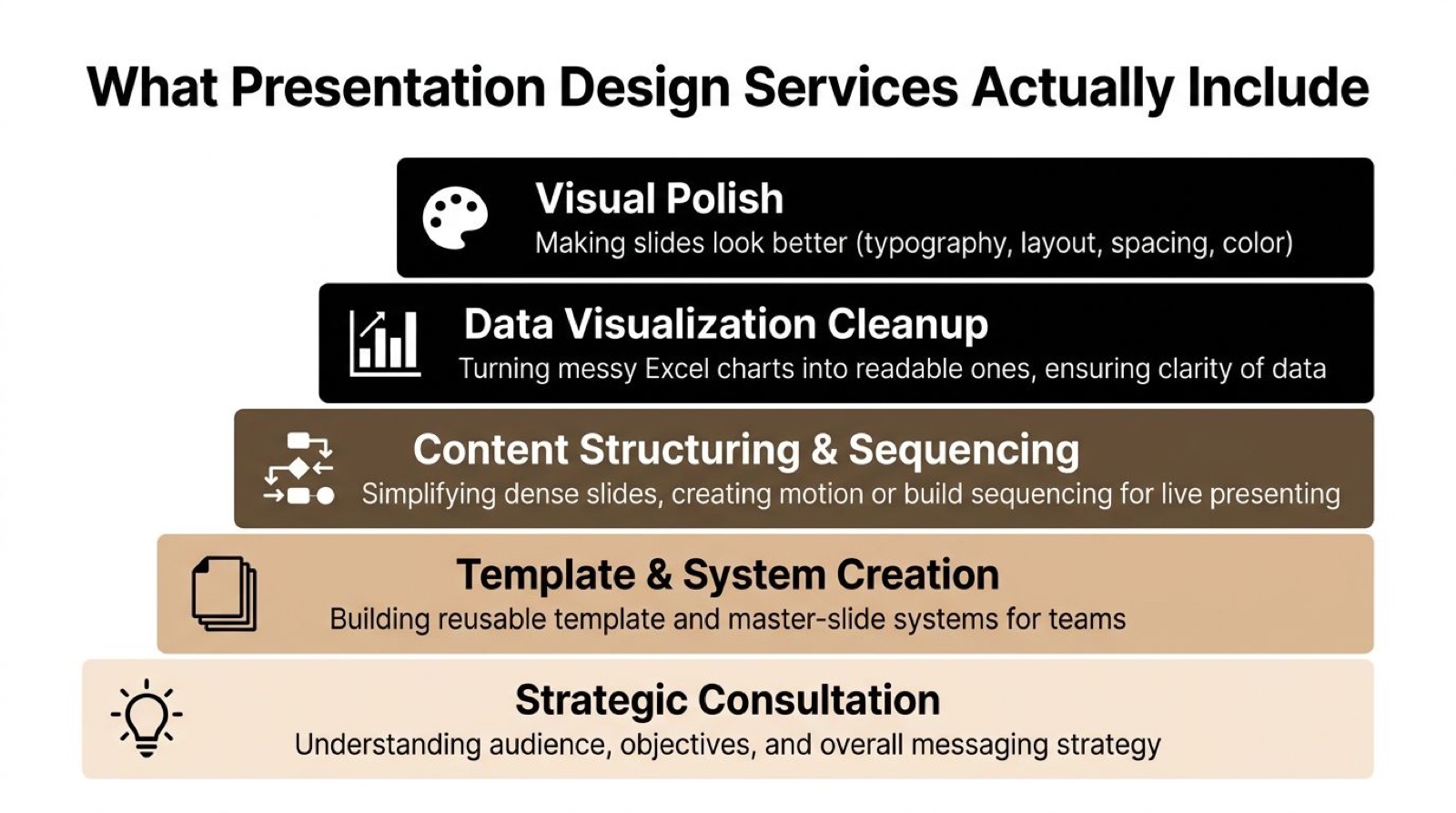
The first layer is visual polish, which covers typography, layout, spacing, and color. That’s the part most buyers notice first. The second layer is data visualization cleanup, where messy spreadsheets and crowded charts get turned into something a room can actually read. This is the layer I end up fighting over most, because clients underestimate how much a bad chart costs them in a live room.
The third layer is content structuring and sequencing. I help simplify dense slides and reorder the argument so it lands during live delivery. For a keynote or board deck, sequencing can matter as much as how the slide looks on screen, and I’ve watched a good argument get lost simply because the slides came in the wrong order.
The fourth layer is template and system creation. That’s the reusable part, master slides, brand-safe layouts, chart styles, and source files that let a team keep producing consistent decks later. The fifth layer is strategic consultation, which is where the work touches the audience and the clarity of the message itself. A strong provider makes the argument easier to understand instead of dressing it up. As guidance on strong presentation design puts it, the work combines story structure, slide layout, visual hierarchy, chart design, copy refinement, and custom templates to reduce cognitive load.
A beautiful deck with a weak argument still fails.
That distinction is why I care so much about scope. A designer who only touches spacing and color is doing one job. A designer who can restructure a cluttered slide is doing a different one. Before you hire, confirm which layers are included, because many providers only cover some of them.
If your team also buys visual or motion work across channels, it helps to compare deck work with broader creative support. Moonb’s overview of creative design services is a useful reference point for where presentation work fits in a larger content system. And if you’re using stock or AI-generated imagery in decks, Secta Labs’ guide to photo usage rights is worth having on hand before anything gets published or presented externally.
Five Ways to Get Your Presentation Designed
A deck should be designed around the job it has to do. A board update needs clarity and restraint. A sales deck needs a tighter story and cleaner proof points. A keynote needs pacing and visual control. The right buying model depends on how often you need decks and how visible they are.
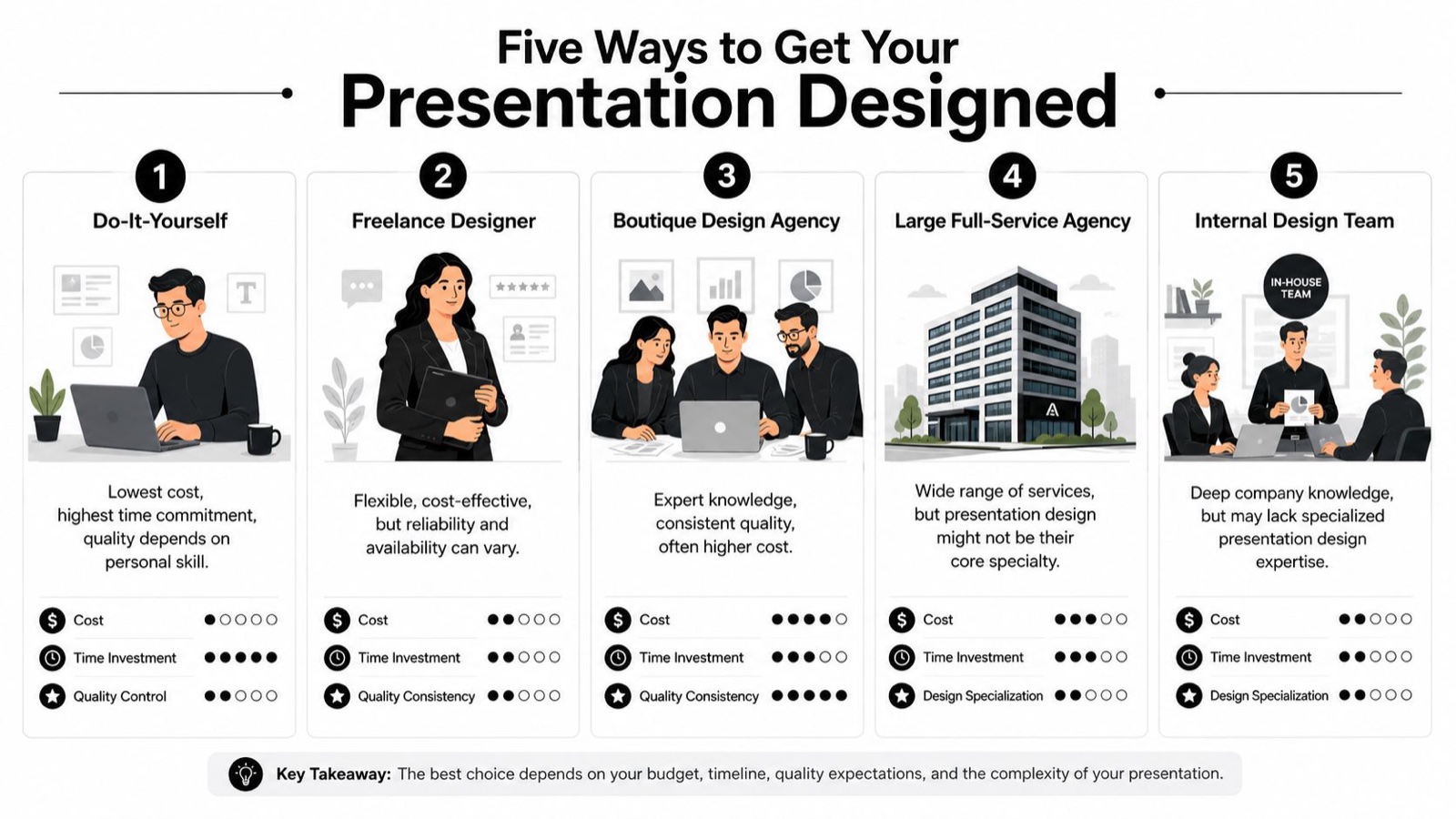
Do-it-yourself works for internal updates and rough drafts, the low-stakes material nobody outside the team will ever see. Tools like Canva, Beautiful.ai, and Pitch are fine when the goal is to move quickly and keep the deck usable. The trade-off is clear. Quality depends on the person building it, and the work drifts if no one owns the standard.
Freelancers fit one-off decks well. They can be flexible and responsive, which makes them useful for a single investor update or event presentation. The risk is also straightforward. A freelancer is one point of failure. If they’re booked or slow on revisions at the wrong moment, the project stalls, and I’ve watched a freelancer-dependent deck freeze because the one person handling it went quiet for a week.
Specialist presentation studios are built for slide craft. They’re usually the right fit for investor decks and keynote work where the story and the visuals both need real attention. You’re paying for depth and for someone who can handle complexity without defaulting to a generic brand treatment.
General creative or branding studios make sense when the deck has to sit inside a larger visual system. They work well if the presentation is part of a broader campaign or brand program. The trade-off is focus. Presentation work may not be the studio’s sharpest specialty, so the slides can look polished without fully serving the speaking or selling job.
Embedded creative teams sit closer to the day-to-day reality of recurring work. This is the model I work inside at Moonb, a dedicated creative team that works on a steady weekly rhythm and handles recurring brand content, including presentation design, alongside video, motion, and design work. That model tends to suit teams that need more than one deck and want consistent execution over time. If your team also needs recurring creative support beyond slides, best unlimited graphic design services is a useful comparison point for judging that model against freelance or studio-based help.
If you need a quick filter, start with frequency and stakes. A single board deck points one way. Ongoing internal updates point another. If your team also manages related marketing, sales, or ops content, Nuveda AI’s article on AI for marketing, sales, operations is a helpful way to see where automation can support the workflow, while still leaving judgment and design decisions to people.
How Much Do Presentation Design Services Cost
Money gets messy fast if you don’t separate types of work. A simple slide refresh, a standard deck, and a reusable template system are different jobs, so I never let them get priced like the same thing.
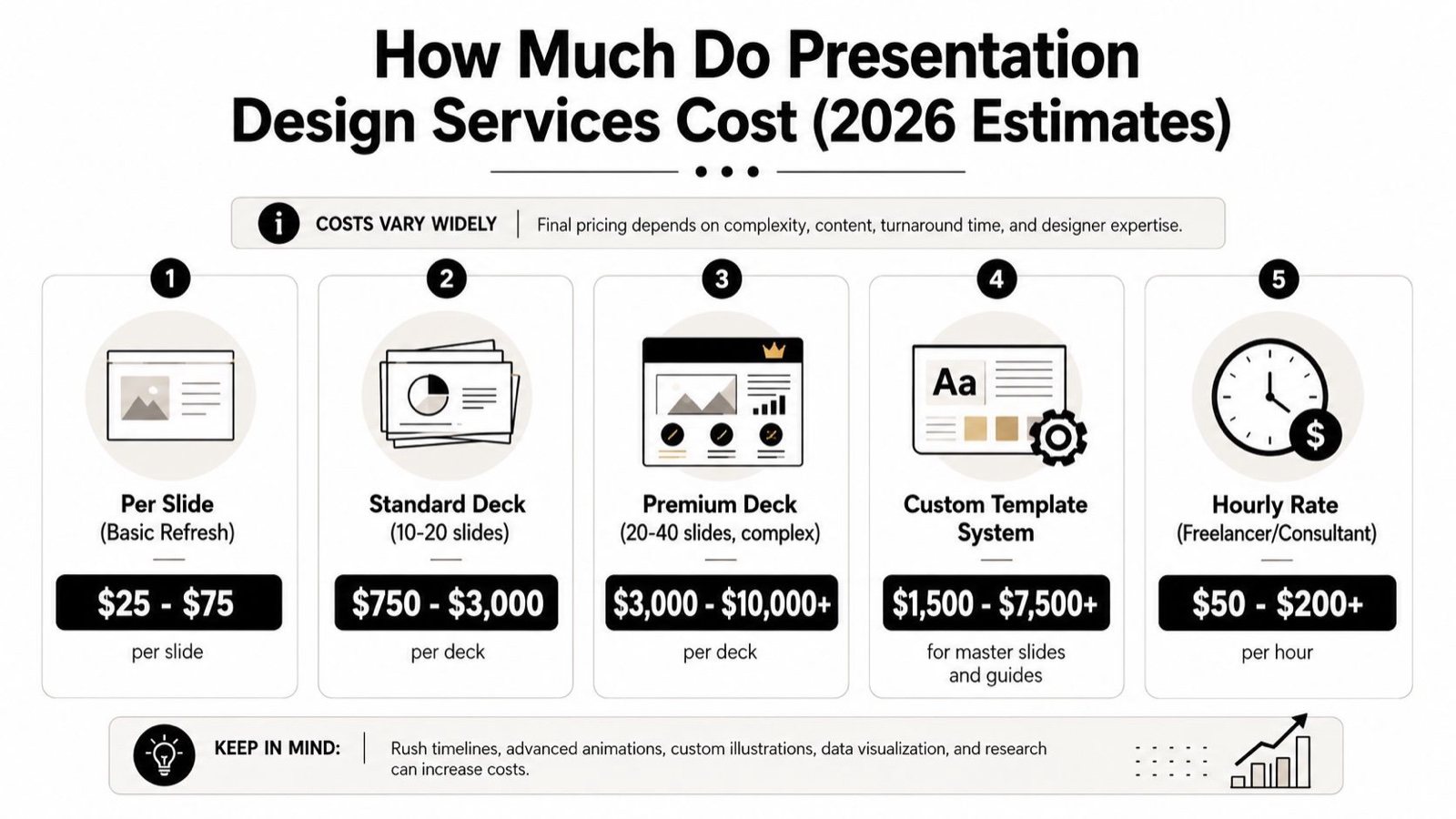
A useful way to read the market is by pricing model. Some providers price per slide, some quote a single project price, and others bill hourly. Industry listings cited by YunoJuno show presentation designer contractor rates averaging $65 per hour, while fund deck projects can range from $5,000 to over $25,000, depending on complexity and storytelling needs. That spread reflects the difference between surface-level cleanup and deeper thinking about research and chart treatment. YunoJuno’s presentation designer rates show how much the market values that depth.
The price moves based on a few things. Slide count matters, because a 12-slide deck and a 40-slide deck are different workloads. Turnaround matters too, because rush work compresses review cycles. Scope matters as well, since a provider only polishing the visuals is doing narrower work than one also fixing the narrative. And a template system costs differently from a one-off deck, because it’s meant to keep paying off across future presentations.
For teams comparing the work with other creative production, it can help to look at similar cost logic in video production pricing. The medium is different, but the same principle holds, scope drives cost.
This TEDx talk on death by PowerPoint is the clearest three minutes I can point a client to on why slide design is a communication problem, not a decoration one.
The practical takeaway is simple. Ask whether the quote covers one deck, a reusable system, or ongoing support. If the provider can’t explain what’s included, that isn’t a clear price. It’s a rough guess, and I’ve seen those guesses balloon once the work starts.
How to Choose the Right Design Partner
A polished portfolio is useful, but it can also hide weak thinking. The better test is whether the designer can simplify a dense slide without flattening the message. Style matters, but problem-solving matters more, and I’ve hired off a gorgeous portfolio and regretted it when the person couldn’t rescue a messy slide.
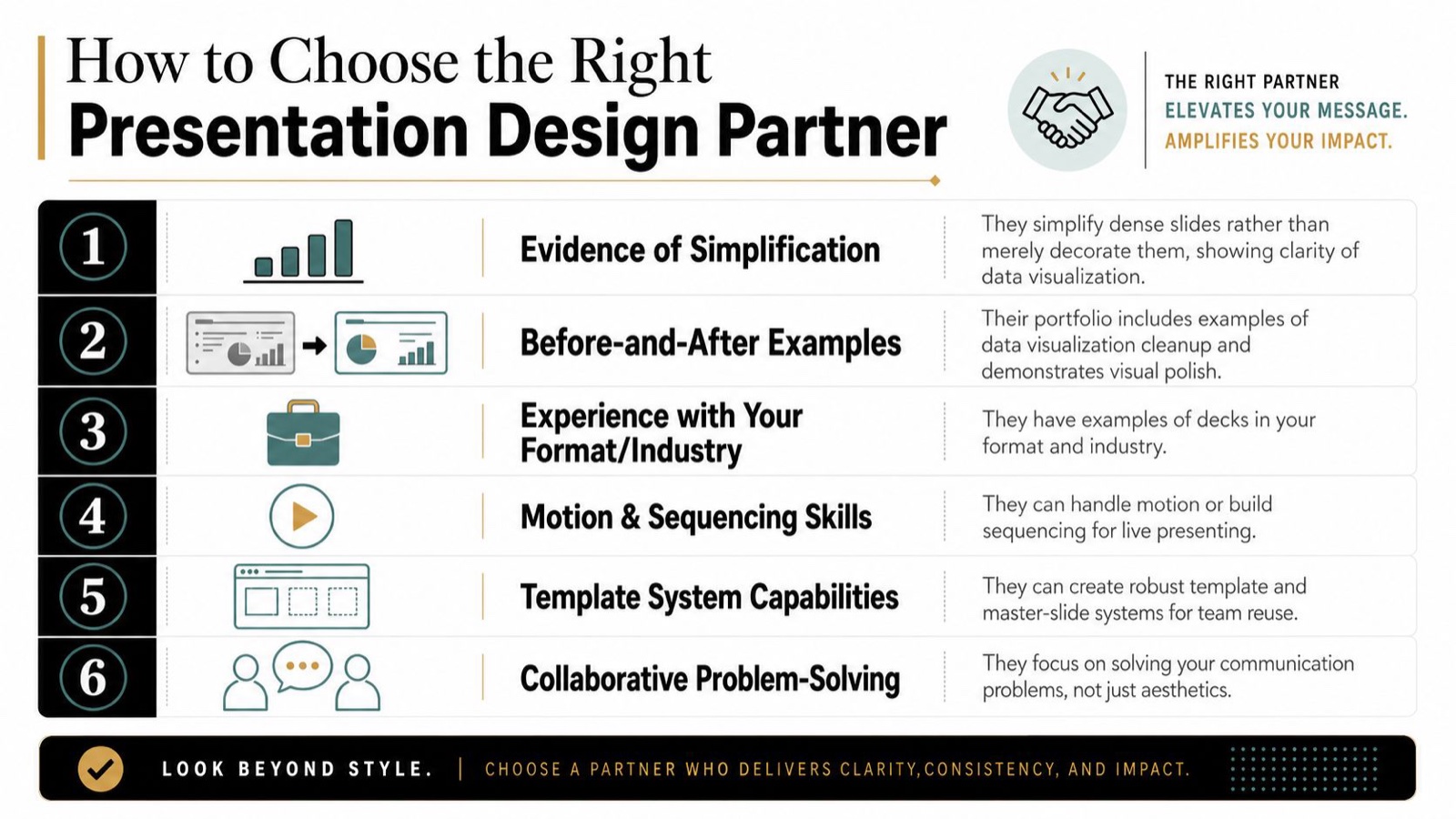
Start with the portfolio. Look for before-and-after examples, not just final slides. That tells you whether the designer can rescue messy input rather than only making already-good content look nicer. Then check for decks in your format and industry, because a strong pitch deck portfolio doesn’t automatically mean strong board work, event work, or sales enablement.
Ask process questions next. Do they return source files? How many revision rounds are included? What software do they work in, PowerPoint, Google Slides, Keynote, or Figma? If they can’t answer that cleanly, I take it as a sign that scope will become a problem later. For teams that manage multiple projects at once, streamlining handoff and feedback is a big deal, and Armox Labs has a solid piece on streamlining creative workflows in design that’s worth a look.
Red flag: if a designer only talks about aesthetic taste and never about structure or audience, they’re a stylist rather than a problem-solver.
Accessibility should be part of the conversation too. Guidance from the University of Washington notes that most presentation advice focuses on polish while overlooking readable color contrast, logical slide structure for screen readers, and alternate formats. A visually impressive deck can still fail if people can’t use it well. That matters in enterprise, healthcare, finance, and any setting where clarity and inclusion both matter. Universal design guidance for presentations makes that gap hard to ignore.
If you want a simple filter, I’d ask one question, “Can this person make a cluttered slide understandable, or only prettier?” The answer tells you a lot.
The Simple Brief for a Better Presentation Deck
The cleanest decks usually start with the cleanest brief. If the designer has to guess at the audience, the decision, or the source material, revisions pile up fast, and I say that from the losing end of plenty of guesswork.
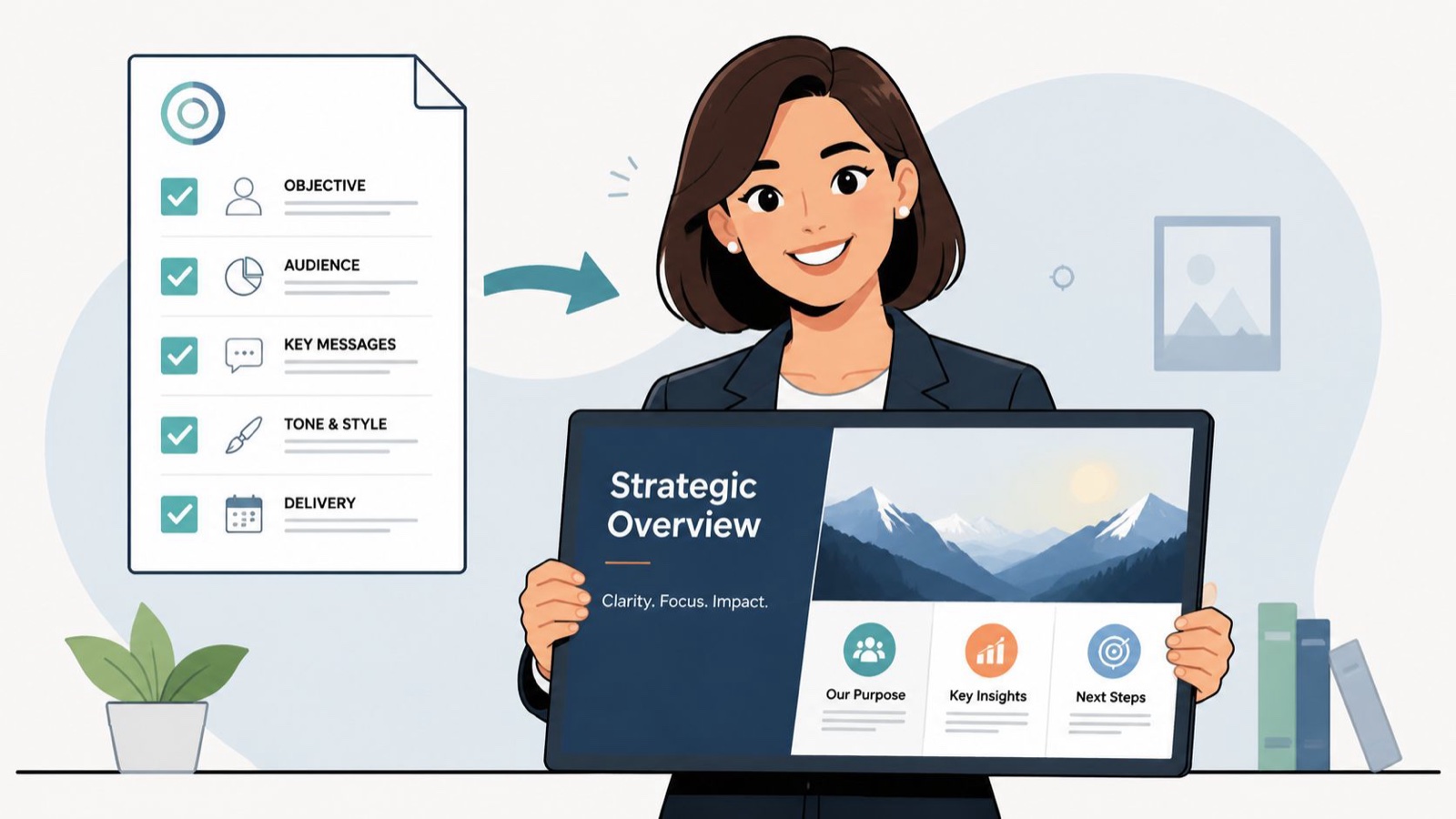
A practical brief should include the audience and the one decision you want them to make. It should also include the current deck or source material, the presentation objective, brand assets, the delivery format, the place it will be shown, the slide count, and the hard deadline with time zone. If the deck is going to be projected in a room, emailed, or delivered live, say that up front.
Real content matters more than placeholder text. I can’t fix a story I can’t read. If your draft is full of lorem ipsum, I’ll spend my time guessing at structure instead of improving the actual argument.
This is the shortlist I’d send every time:
- Audience and outcome: who’s in the room, and what decision should they make?
- Source material: the current deck, notes, data, or draft content.
- Brand assets: logo files, fonts, colors, and any existing templates.
- Format and setting: live presentation, emailed PDF, projected keynote, or internal review.
- Scope: expected slide count, required deliverables, and any must-keep slides.
- Deadline: exact due date, time zone, and any review checkpoints.
- Decision-maker: one person who can approve changes without delay.
A vague brief is one of the fastest ways I know to create extra revision rounds. The more clearly you define the problem, the faster the deck comes back in shape. For a deeper walkthrough, Moonb’s creative brief template is a practical companion.
If you’re preparing a high-stakes deck right now, pull your source content together, write the decision in one sentence, and send that brief before anyone starts polishing slides. The better the brief, the faster the design work becomes useful.
Frequently asked questions
When the stakes of the room justify it: a board meeting, an investor pitch, a keynote, a major sales deck. For a weekly internal update, a clean template is fine. The question is not how important the slides feel, it is what a wrong impression in that specific room would cost.
A designed deck carries an argument. The structure, the pace and the emphasis are built around what the audience needs to understand and in what order, so the one number that matters is impossible to miss. A template arranges content neatly without deciding what the point is.
For a fast internal deck, often yes. For a deck that has to persuade, the tool arranges content without understanding the argument, and a board or investor feels that gap. The useful move is to draft structure quickly, then spend the real effort on the story and the cuts, which is the part the tools skip.



