Canva vs Figma A Definitive Guide for Marketing Teams

Let's cut to the chase: Canva is for creating marketing collateral quickly and easily, while Figma is a powerhouse for building complex, collaborative design systems. Your decision boils down to a simple trade-off: do you need speed and accessibility, or precision and control?
Choosing Your Creative Workflow Engine
The Canva vs. Figma debate isn't just about features; it’s a strategic choice that will define your team's creative speed and ability to maintain brand integrity. For marketing leaders, the real question is which platform helps you produce more high-quality content without sacrificing consistency. The answer isn’t about which tool is universally "better," but which one is the right fit for your team’s skills, your project types, and how you collaborate.
This guide goes beyond a simple feature list to give you a real-world analysis, helping you pick the right creative engine for your team. A solid creative process is the backbone of any great marketing team. If you're looking to tighten up your own operations, it's worth understanding the key stages in a creative workflow process.
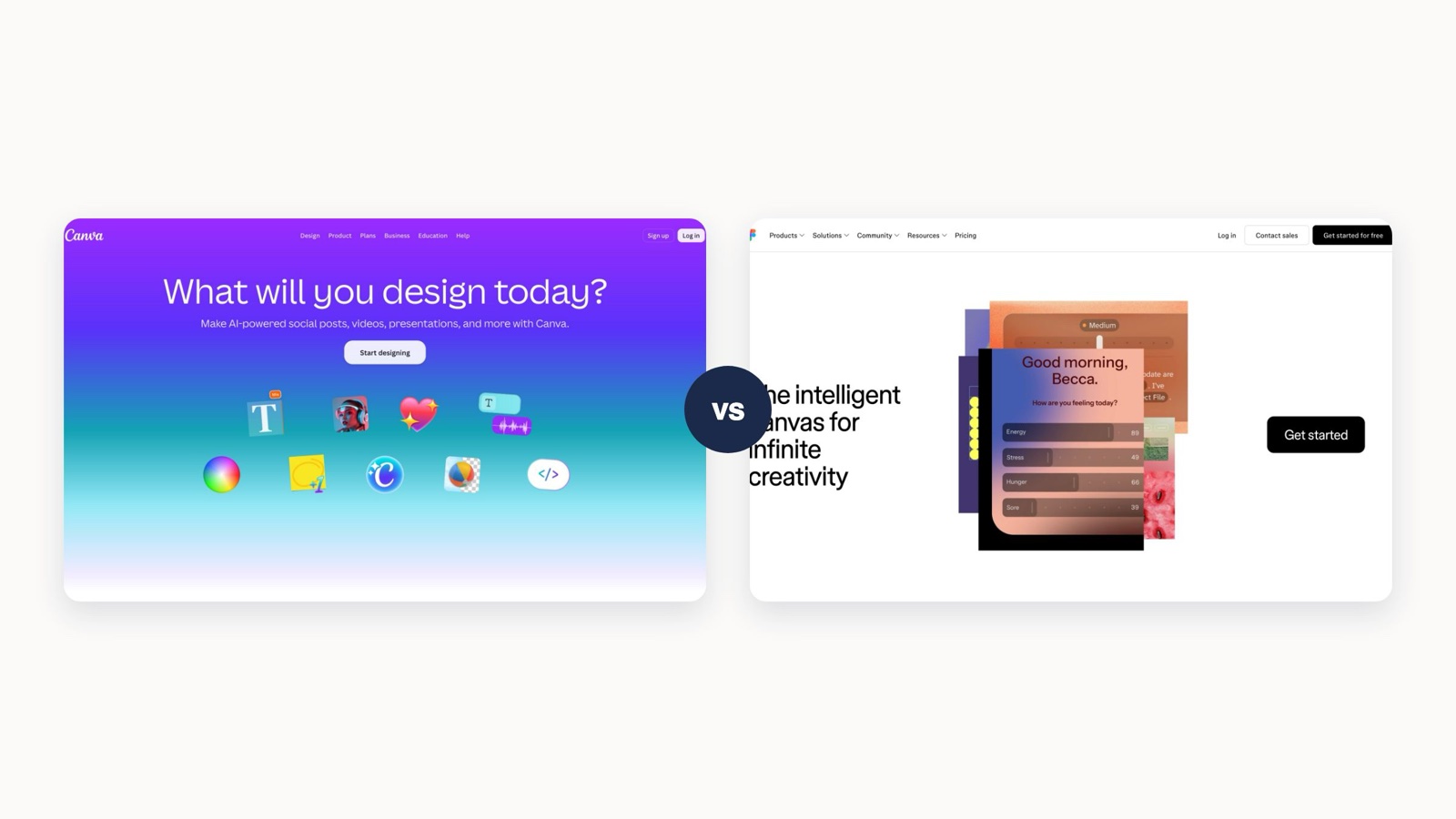
The image below perfectly captures the core difference. Canva is like an assembly line for content, built on templates. Figma is more like an architect's drafting table, focused on creating the underlying systems.

You can see it right there—Canva is all about getting finished assets out the door, while Figma is about building the reusable components that make those assets.
Canva vs Figma At a Glance for Marketers
To kick things off, here’s a high-level look at how each platform stacks up for marketing teams. This table cuts straight to what matters most when you're making a decision.
This comparison helps frame the initial choice, but it's also worth thinking about other collaborative tools your team uses. For instance, many teams need a digital whiteboard for brainstorming sessions and are often on the hunt for effective Jamboard alternatives to fill that gap.
To really get to the bottom of the Canva vs. Figma debate, you have to look past the feature lists and understand what each tool was fundamentally built to do. They come from two completely different worlds, and their core philosophies shape everything from the user experience to their ultimate purpose. They solve different problems for different people—and figuring that out is the first step.

Canva's mission is simple: democratize design. It was created for the millions of us—marketers, founders, social media managers—who need to create professional-looking stuff without a design degree. Its entire DNA is coded for accessibility and speed.
This is why Canva is so dependent on templates. It’s not a bug; it’s a feature. The templates act as guardrails, making sure that even someone with zero formal training can put together something that looks genuinely good.
Canva: The Accessible Content Engine
Canva is all about "what you see is what you get." It prioritizes ease of use and speed over having total, granular control. The whole point is to get you from a spark of an idea to a finished social media post or presentation in minutes, not hours.
Think of it as a creative kitchen stocked with pre-made ingredients and simple recipes. You just assemble, customize a bit, and serve.
Canva’s magic is in removing friction. It’s not about giving you infinite control over every pixel; it's about giving you the fastest, smoothest path to a polished, on-brand result. This is exactly why 85% of Fortune 500 companies use it for their day-to-day design needs.
This philosophy makes Canva the go-to for teams that need to churn out high volumes of content quickly. A new hire can jump in and be productive almost immediately, keeping the content flowing without a massive learning curve.
Figma: The Collaborative Design System
Figma, on the other hand, grew up in the world of professional UI/UX design. Its philosophy is built on three pillars: precision, scalability, and deep collaboration between designers, developers, and product managers. It’s more than just a design tool; it’s a shared source of truth for building entire digital products.
Figma is architected around the concept of a design system—a central library of reusable components, styles, and rules. This is what allows a product or brand to scale while keeping its visual identity perfectly consistent across every single screen and interaction. It’s a tool for architects, not just for decorators.
Of course, this system-based approach requires more setup upfront and a real understanding of design principles. But the payoff is huge, letting teams build incredibly complex apps and websites with a level of consistency and efficiency that would otherwise be impossible.
Ultimately, Figma is the engine for teams who build the products, not just the ads that promote them. And that’s the core of the Canva vs. Figma choice: do you need a quick-turnaround content machine or a powerful, systematic platform for building scalable digital experiences?
A Feature Deep Dive for Marketing Workflows
Choosing between Canva and Figma really comes down to what your team does day in and day out. A tool's real worth isn't just a long list of features; it's how well it helps your team get their actual work done. This is where the big-picture differences—Canva’s ease of use versus Figma’s deep precision—start to matter in a real-world way.
Let’s get practical and break down how each tool handles three of the most common jobs in marketing: creating social media content, keeping the brand consistent, and building digital ads. This head-to-head look will show you which platform really fits your team’s rhythm and creative needs.

Social Media and Content Creation
For most marketing teams, social media is a beast that constantly needs feeding. You have to pump out a steady stream of good-looking content without getting bogged down for hours on every single post.
This is exactly what Canva was built for. Its biggest advantage is a massive library of ready-to-go templates. Anyone on the team—and I mean anyone—can jump in and whip up a sharp Instagram story, a professional LinkedIn banner, or a slick YouTube thumbnail in just a few minutes. The drag-and-drop interface just works, tearing down all the technical walls.
Figma, on the other hand, is a completely different ballgame. You can absolutely create social media templates in Figma, but you have to build them from the ground up. This gives you god-tier control over every pixel, but it takes a whole lot more time.
Key Differentiator: Canva is all about speed and getting things out the door with templates. Figma is about total precision with custom-built components. For a marketing team that needs to post daily, Canva’s workflow is the hands-down winner.
You can see this difference in who uses each tool. Figma pretty much owns the UI/UX design world, with an estimated 80-90% market share in that space. Canva’s bread and butter is making design accessible for non-designers, with 62% of its users being from micro and small businesses. It’s perfect for teams that want professional-looking results without needing a design degree.
This difference in audience is why Canva’s features are all geared toward marketing speed. Take Magic Studio, their AI toolkit. It can spit out copy, resize a design for five different platforms with one click, and even build an entire presentation from a simple text prompt. Figma’s AI is more focused on helping designers generate UI elements and code, which is a whole other world.
Brand Management and Consistency
Keeping the brand looking consistent across every single thing you put out is absolutely non-negotiable. When we compare Canva and Figma here, things get a bit more interesting because both have great solutions, they just come at it from different angles.
Canva's answer is the Brand Kit. It's a simple, central hub where you upload your logos, set your brand colors, and lock in your fonts. Once that’s set up, your whole team can pull from these assets, making it super easy to stay on-brand with every design. It’s a clean system that’s perfect for keeping everyone on the same page, especially if your team is spread out. If you want to get this set up right, check out our guide on how to use Canva like a pro.
Figma’s solution is Design Systems, and it’s a much bigger, more powerful beast. A design system in Figma isn't just a folder of assets; it's a complete library of reusable components like buttons, icons, and form fields, along with locked-in text styles, color palettes, and spacing rules. It's the absolute single source of truth for a brand's entire look and feel.
Here’s how they stack up for marketers:
- Canva’s Brand Kit: Super easy to set up. It’s ideal for applying the basics like logos and colors and perfect for teams that need to keep things consistent without a major learning curve.
- Figma’s Design Systems: This needs a skilled designer to build and maintain, but it gives you a level of control and scalability that's unmatched. It's a must-have for companies with complex digital products where every UI element needs to be perfect.
Honestly, for most marketing teams, Canva’s Brand Kit is more than enough and way more practical. Figma's design systems are usually overkill unless your marketing team works hand-in-glove with the product design team to keep a website, an app, and all your marketing materials perfectly aligned.
Digital Ads and Presentations
Creating digital ads and presentations that actually grab attention is another marketing staple, and here again, Canva and Figma have their own strengths.
Canva shines when it comes to creating static or simple animated ads for platforms like Meta and the Google Display Network. The built-in libraries of stock photos, videos, and music, plus the dead-simple animation presets, make it a breeze to produce eye-catching ads fast. The same goes for presentations—Canva's templates will get you to a finished, polished deck way faster than starting with a blank slide.
Figma, true to form, is the go-to for more complex ad concepts or interactive prototypes. Its vector editing tools are way more powerful, which is what you need for designing custom graphics, logos, or illustrations for a big campaign. If your ad needs a unique animation or you want to prototype how a user might interact with it, Figma’s toolkit is far more capable.
And then there's the plugin ecosystem. Figma has a huge library of plugins that can do almost anything—connect to data sources, build complex charts, or export assets in very specific formats for ad networks. It offers a level of customization that Canva just can’t touch.
But all that power comes with complexity. For the average marketer who needs to bang out five versions of a display ad before their coffee gets cold, Canva's all-in-one approach is simply the more sensible choice.
Here's a quick breakdown of which tool handles common marketing tasks better.
Marketing Task Performance Matrix
Choosing the right tool often comes down to the specific task at hand. While both Canva and Figma are powerful, they excel in different areas of the marketing workflow. This matrix breaks down common marketing design tasks and recommends the best tool for the job based on efficiency, control, and final output quality.
Ultimately, the "winner" for each task depends on your team's priorities. If speed and ease of use are paramount for daily content creation, Canva consistently comes out on top. If precision, scalability, and deep customization are non-negotiable for high-impact projects, Figma is the clear choice.
Collaboration and Cross-Functional Integration
Creative work isn't done in a vacuum. A project's success often comes down to how well teams can communicate, review designs, and hand off assets. When you put Canva and Figma head-to-head, this is where the differences really start to show, as each tool was built for completely different collaborative loops.
Canva is all about streamlining the content review process for marketing teams. Its collaboration tools are simple and intuitive, built for speed and clarity, especially when non-technical people are involved.
Canva for Marketing-Centric Reviews
Canva’s workflow is straightforward: a marketer creates a design, shares a link, and the team jumps in to leave comments directly on the file. Features like real-time editing and simple approval flows let a social media manager, copywriter, and marketing director all give feedback at the same time.
It keeps all the feedback in one place, so you can finally say goodbye to those confusing email chains. This is perfect for the breakneck speed of marketing review cycles. The whole process stays within the marketing ecosystem, meaning everyone can contribute without needing any specialized design skills.
The heart of Canva's collaborative power is its accessibility. It’s designed for marketers to give feedback to other marketers, knocking down the technical barriers that can grind content production to a halt.
Figma for Deep Cross-Functional Workflows
Figma, on the other hand, was built for a much broader—and more technical—group of collaborators, reaching far beyond just the design team. It acts as a central hub where designers, product managers, engineers, and marketers can all work together. Its legendary "multiplayer" mode lets dozens of people work in the same file at once, a must-have for complex product design.
You can see this philosophy in its user base. A surprising two-thirds of Figma's users aren't even designers; they're product managers and engineers using the platform as a shared source of truth. It's no wonder that giants like Microsoft and Netflix lean on it so heavily.
This cross-functional strength shines through in features designed to bridge the gap between departments:
- Dev Mode: This is a game-changer. It gives developers the code, specs, and assets they need right from the design file, which drastically speeds up the handoff from design to development.
- Robust Version Control: Figma offers a version history that feels a lot like Git. Teams can track every change, create separate branches for experiments, and merge updates without worrying about losing work.
- Extensive Plugin Ecosystem: The tool integrates with essentials like Jira and Slack, embedding design work directly into the project management flows your team already uses. You can learn more about how plugins and extensions boost productivity in our related article.
For teams working across different platforms, understanding how to connect them is key. For example, a good guide to the Figma to Elementor workflow can make collaboration much smoother.
Ultimately, the right choice boils down to who needs a seat at the table. If collaboration happens mostly within your marketing team for quick content reviews, Canva’s simplicity is hard to beat. But if your creative process requires tight integration with product and engineering to build digital experiences, Figma provides the powerful, cross-functional bridge you need to get everyone aligned.
Pricing Structures and Long-Term Scalability
It’s easy to get lost in the features, but the real test for any tool is how it impacts your budget and grows with your team. This is where Canva and Figma diverge significantly. Both have great free plans, but their paid models are built on completely different philosophies, which will shape your total cost as you scale.
Canva's pricing is refreshingly simple. Its free version is one of the most generous out there, giving you a massive head start with templates and assets. When you step up to Canva Pro or Canva for Teams, you’re paying for an all-in-one package: premium content, better brand management with the Brand Kit, and the entire AI-powered Magic Studio. The appeal is bundled convenience—one predictable fee covers your content, tools, and storage, making life easier for marketing budgets.
Understanding Total Cost of Ownership
Figma, on the other hand, takes a more modular approach. The free "Starter" plan is fantastic for solo users, but as soon as you bring in a team, you'll be looking at the Professional or Organization plans. These unlock the essentials for working together, like shared libraries and version history. But here’s the catch: a lot of Figma's real power is unlocked through its incredible ecosystem of plugins, and many of the best ones come with their own subscriptions.
This changes the math entirely. With Canva, what you see is what you get. With Figma, the sticker price is just the beginning; your actual cost will depend on the extra tools you bolt on to perfect your workflow.
When thinking about scalability, it’s worth looking at market stability. Canva's all-inclusive model has resonated in a big way, attracting over 170 million users and earning the trust of 85% of Fortune 500 companies. Its growth to an estimated $3 billion in Annual Recurring Revenue signals a healthy, sustainable platform that is constantly plowing money back into product development. You can get a deeper look at Canva's massive market footprint on cropink.com.
Aligning Cost with Team Growth
For a scrappy marketing team that needs to pump out content fast, Canva’s all-in-one subscription is almost always the more cost-effective choice. You won’t need many external tools, and the flat per-seat price makes it easy to predict costs as you add more creators to the team.
But if your organization has a dedicated design team that works hand-in-hand with product and engineering, the investment in Figma is a strategic one. The cost is easily justified by the massive efficiency gains in design system management and developer handoffs. The ability to build a custom toolkit with plugins offers a level of long-term flexibility that a closed system just can't match.
For teams who want that high-level creative output but aren't ready to hire a full-time specialist, exploring a subscription-based design service can be a smart, scalable middle ground.
In the end, it comes down to which pricing model best fits how your team works and where you see it going.
Making the Right Choice for Your Team
The "Canva vs. Figma" debate doesn't have a single right answer. It only has the right answer for your team's specific situation. The best choice really comes down to a clear-eyed look at what you’re creating, your team’s technical skills, and how you collaborate. It's less about which tool is better overall and more about which one actually fits your strategy.
This breakdown will cut through the feature lists and give you some actionable, real-world recommendations. We'll explore clear scenarios for picking one over the other and even talk about a powerful third option many teams are adopting: using both tools for their respective strengths.
When to Choose Canva
Canva is your undisputed champion if your team's world revolves around speed, volume, and accessibility. It’s the perfect choice when your main goal is to empower non-designers to create on-brand marketing content quickly and efficiently.
Choose Canva if your team looks like this:
- Primary Output is Marketing Collateral: Your daily grind involves social media graphics, presentations, simple video ads, and internal documents.
- Team Composition is Mostly Non-Designers: The people creating content are marketers, social media managers, or sales staff who need tools that just work, no steep learning curve required.
- Speed is Non-Negotiable: Your workflow demands a ton of content with quick turnarounds. Template-based creation isn't just a nice-to-have; it's a necessity.
- Collaboration is Marketing-Centric: Reviews and approvals mostly happen within the marketing department, so simple commenting and sharing features are all you need.
For teams focused on content velocity, Canva is a force multiplier. It removes technical barriers, ensuring brand consistency without requiring every user to have a deep understanding of design principles.
When to Choose Figma
Figma is the right strategic investment when your projects demand precision, scalability, and deep cross-functional collaboration, especially with product and development teams. It's built for creating foundational brand assets and complex digital experiences from the ground up.
Choose Figma if your team fits this description:
- Primary Output is Digital Products or Systems: You design websites, mobile apps, custom icons, or detailed brand identity systems.
- Team Includes Professional Designers: You have dedicated UI/UX designers who need advanced vector tools, component libraries, and robust prototyping capabilities.
- Precision and Scalability are Key: Every pixel matters. You need to build a design system that keeps everything consistent across a complex product ecosystem.
- Collaboration Extends to Developers: Your workflow requires a seamless handoff to engineering, making features like Dev Mode and version control absolutely essential.
For a clearer view, this infographic shows a decision tree to help guide your choice based on team structure and budget.

The visual guide highlights how Canva's plans are structured around content access and team size, while Figma's tiers scale with professional-grade collaboration features.
The Hybrid Approach: Using Both Tools
More and more, the smartest choice isn't "either/or" but "both/and." A hybrid model plays to each platform's core strengths, creating a highly efficient, two-tiered creative workflow. It combines professional-grade design with scalable content production.
Here’s how it works:
- Figma for Foundations: A design lead or agency partner uses Figma to create the core brand identity. This means logos, custom iconography, detailed brand guidelines, and key website or app UI components. These are the high-stakes assets that require absolute precision.
- Canva for Execution: The approved assets from Figma—like logos, icons, and color palettes—are uploaded into Canva’s Brand Kit. The wider marketing team then uses these elements within Canva’s templates to rapidly produce day-to-day content like social posts, ads, and presentations.
This approach ensures the foundational brand is professionally crafted and locked down, all while empowering the entire marketing team to execute campaigns at speed. It’s a practical solution that acknowledges the different needs within a modern creative process. This strategy also aligns well with best practices for marketing asset management, where core files are centrally managed and derivative content is produced efficiently.
Finally, to really nail down your decision, run through this checklist. Your answers will point you directly to the best-fit solution—or combination of solutions—for your organization's unique needs.
Decision Checklist
- Who is creating? (Marketers vs. Designers)
- What are you creating? (Social media content vs. UI/UX)
- What is your priority? (Speed vs. Precision)
- Who are you collaborating with? (Marketing vs. Developers)
- What is your budget structure? (All-inclusive vs. Modular)
Answering these five questions honestly will cut through the noise of the Canva vs. Figma comparison. It will move you from debating features to making a strategic choice that gives your team the right creative engine to drive your business forward.
Got Questions? We've Got Answers
Even after a side-by-side look, you probably have a few specific questions bouncing around. Let's tackle the most common ones we hear from marketing teams trying to nail down their final decision on Canva vs. Figma.
Can We Actually Use Figma for Social Media Instead of Canva?
Yes, you absolutely can—and for creating core, brand-defining templates, many designers insist on it. Figma gives you that fine-tuned, pixel-perfect control you need for building sophisticated assets from scratch that can be used for months or even years.
But here’s the trade-off: speed. For a busy marketing team that doesn't have a dedicated designer on standby, Canva’s massive template library and drag-and-drop workflow are just plain faster. Figma has a steeper learning curve, which can be a real bottleneck when you’re trying to keep up with a packed social media calendar.
Our take: For the daily grind of quick-turnaround content, Canva is the practical, get-it-done choice. For crafting the foundational social media templates that will define your brand's look, Figma's precision is worth the upfront investment.
Is Canva “Professional Enough” for Brand Identity Design?
Canva is fantastic for applying and managing a brand identity that already exists. Its Brand Kit feature is a game-changer for consistency. You can load it up with your logos, color palettes, and fonts, empowering literally anyone on your team to create on-brand materials without a second thought.
However, when it comes to building a brand identity from the ground up, a true vector tool like Figma or Adobe Illustrator is still the gold standard. You just need that granular control and technical precision to design a professional, scalable logo system. Think of it this way: use a heavy-duty tool to forge the brand, then use Canva to deploy it everywhere.
When Does It Make Sense for a Team to Use Both?
Honestly, this is the sweet spot for most modern marketing teams. A hybrid approach lets you tap into the best of both worlds, pairing professional-grade design with fast, scalable content creation. It’s a two-tiered system that just works.
Here’s what that workflow looks like in the real world:
- Figma for the Foundation: A design lead or an outside partner uses Figma to build the core brand assets. This is where your primary logo, custom icons, website mockups, and detailed ad concepts are born.
- Canva for Daily Execution: Those polished assets are then uploaded directly into your Canva Brand Kit. Now, the rest of the marketing team can grab them to whip up daily social posts, simple slide decks, and quick ad variations using Canva’s super-intuitive templates.
This setup ensures your most important brand assets are built to the highest standard, while the rest of your team can move at the speed marketing demands.
Ready to scale your creative output without the overhead? Moonb provides a full creative department on-demand, from strategy to execution. Get unlimited design and video with a flat monthly fee. Discover how Moonb can elevate your brand today.