
How to Turn Complex Products Into Simple Video Stories


Trying to explain a sophisticated SaaS platform with a wall of text is a losing game. You know it, I know it. The best way I've found to turn a complex product into a simple, engaging story is to zero in on its core value. What's the single biggest problem it solves? Once you have that, you wrap it in a relatable story. That's how you turn a dense feature list into something that actually gets people to listen, understand, and act.
Why Video Makes Complex Products Click

Explaining a multi-layered product with just text is like handing someone IKEA instructions written in ancient Greek. Sure, they might figure it out eventually, but they'll be frustrated and confused the whole time. Video just cuts through all that noise.
Our brains are hardwired for visuals. In fact, we process visual information 60,000 times faster than text, making video an incredible shortcut to "Aha!" moments. When you're trying to explain abstract concepts—like how your AI algorithm crunches data or how blockchain secures a transaction—animation makes the intangible, tangible.
The Psychology of Visual Learning
Visuals do more than just speed things up; they make understanding deeper. By combining images, motion, and sound, you're hitting multiple senses at once, which helps lock information into your viewer's memory. This is non-negotiable for products with a steep learning curve.
Instead of just telling someone about a feature, a video can show them how it works in a real-world scenario. This helps potential customers connect the dots between what your product does and the headaches they're dealing with every day. Digging into the benefits of explainer videos makes it clear just how powerful they are at closing that knowledge gap.
A great product video doesn’t sell features; it sells a better version of the customer’s future. It shows a clear path from their current frustration to a future state of success, powered by your solution.
The data backs this up, time and time again. Recent video marketing stats show that 93% of marketers say video has massively improved user understanding of their product. This is especially true in tech, where 96% of people have watched an explainer video to learn about a product or service.
The 'One Thing' Framework For Your Video Story
Before you even think about a script or animation, you have to get ruthlessly simple with your product's value. This quick framework helps distill your complex product into a simple, core message before you start scripting.
This exercise isn't about dumbing down your product. It’s about finding its emotional and practical core. This "one thing" becomes the north star for your entire video, ensuring every scene, word, and graphic drives that single point home. To dig deeper into making your videos more effective, check out this guide on how to create product videos that convert.
Uncovering The Human Story In Your Tech
Let's be honest. Your product's code, algorithms, and slick architecture are impressive, but they aren’t the story. Not the one that sells, anyway.
The real narrative, the one that actually connects with people, is found in the human problems your technology solves. To make a video that gets people to care, you have to stop focusing on what it does and start showing what it enables people to do. It's a subtle but crucial shift. This means digging for the authentic, relatable experiences hidden within your own user base.
The best way to do this? I call it "story-mining." It's a simple process of talking to the two groups of people who know the customer’s world inside and out: your sales team and your actual customers. They’re sitting on a goldmine of stories that will make your video resonate.
Mining For Gold With Your Sales Team
Your sales team is on the front lines every single day. They hear the raw, unfiltered frustrations, the specific workflow nightmares, and the "if only we could..." wishes directly from your prospects. They aren't just selling features; they're selling an escape from a tangible pain.
Set up a few quick chats with your top-performing sales reps. But here's the key: don't ask them to list features. Ask them story-based questions that get to the human element of it all.
- What's the one complaint you hear over and over from prospects?
- Describe that moment in a demo when a prospect’s eyes light up. What did you just show them?
- What’s the most powerful success story a client has ever shared with you?
- What analogies do you use when a prospect just isn't getting our most confusing feature?
These kinds of questions bypass the technical jargon and cut straight to the emotional core of why your product matters. Their answers are the raw material for a story people will actually want to watch. If you want to see this in action, check out these powerful visual storytelling examples that absolutely nail this approach.
The Before-And-After Customer Interview
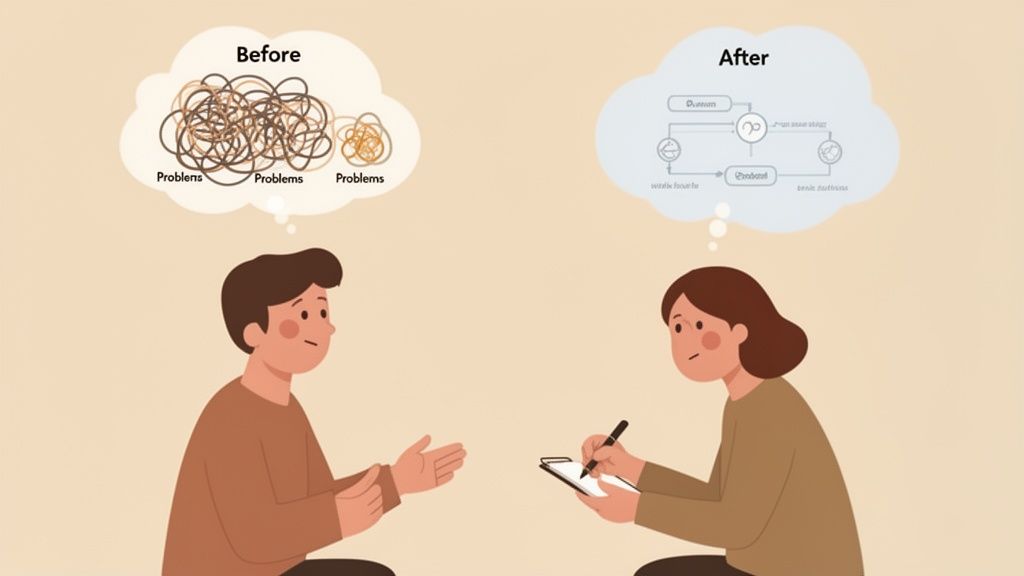
While your sales team uncovers the problems, your happiest customers provide the triumphant solutions. The trick here is to frame your interviews around a simple "Day in the Life" scenario. You want to capture the stark contrast between their reality before your product and their new reality after. It's a classic narrative structure for a reason—it’s deeply human and instantly relatable.
When you get a customer on a call, guide them through their journey:
- Before: "Walk me through what a typical Tuesday looked like before you found us. What were the most frustrating, hair-pulling parts of your day?"
- The Turning Point: "What was the specific problem or event that finally made you say, 'Enough is enough, I need a better way'?"
- After: "So, what does that same Tuesday look like now? What do you do with the time, energy, or sanity you've gotten back?"
Your goal isn't to get a glowing, generic testimonial. It's to extract a specific, authentic story of transformation. A story about "saving three hours a week on mind-numbing reports" is infinitely more powerful than a vague statement like "the product is great."
This process of finding the human angle is the absolute foundation for turning a complex product into a simple, compelling video. Once you anchor your tech in a real person's struggle and eventual success, the features stop being a boring list and naturally become the heroes of the story—the tools that made the happy ending possible.
This is how you make your audience feel seen, understood, and ready to take the next step.
Crafting A Script That Simplifies And Sells
Once you've nailed down the human story, it’s time to build the script—the blueprint that turns a complex product into a simple, compelling video. Writing for video is a totally different ballgame. You’re writing for both the ear and the eye, and every single word has to pull its weight and support the visuals.
The mission is to be concise, clear, and punchy. This is exactly where so many videos fall flat. They get bogged down in technical jargon and laundry lists of features. You’re not writing a user manual; you're guiding someone from a point of frustration to a moment of "aha!" clarity.
Choose Your Narrative Framework
Don't start with a blank page. Leaning on a proven narrative structure gives your story a solid foundation and a natural flow that keeps people watching. For tricky products, three frameworks are gold.
- The Problem-Agitate-Solve (PAS) Model: This is the undisputed workhorse of explainer videos. You kick things off with a problem everyone in your audience recognizes. Then you agitate it—really dig into the frustrations it causes. Finally, you roll in with your product as the obvious, elegant solution. It’s direct, powerful, and perfect for demand-gen videos.
- The Aspirational Journey: This one is less about a specific pain point and more about painting a picture of a desired future. Think brand-building. The story follows a hero (your customer) on their quest to achieve their biggest goals, with your product acting as the trusty sidekick that helps them succeed.
- The Feature as Hero: Got one killer feature that’s a bit complicated but incredibly powerful? This is your move. You build a micro-story around that single function. The feature becomes the hero that slays a very specific dragon, making this approach perfect for targeted demos or onboarding flows.
The Power Of A Perfect Analogy
Analogies are your secret weapon for making the complex feel simple. They act as a bridge, connecting something your audience already gets with the new concept you need to teach them. A great analogy makes an abstract idea feel instantly tangible.
Imagine explaining an API. You could drone on about endpoints and data requests. Or, you could say this:
"Our API works like a universal translator for all your software. It lets your CRM have a fluent conversation with your accounting platform, so they can share info without any mix-ups."
See? The second one just clicks. It swaps out the tech-speak for a simple, visual idea. As you write, keep asking yourself, "What is this like?" The answer is often the key to unlocking real understanding. If you want to go deeper on this, check out our guide on how to craft an explainer video script.
Cutting Jargon Without Losing Credibility
Ditching industry jargon is non-negotiable, but it doesn't mean you have to dumb things down. The goal is to speak your customer's language, not your engineer's. Use the exact words they use to describe their problems. This builds instant trust and shows you're in their world.
Getting this right has a massive impact. Globally, 96% of consumers watch explainer videos to understand products better, and a clear script is the main reason why. It’s even been shown that simple video explanations can slash support tickets by 57%. This proves a good story doesn't just sell—it saves you headaches down the road. You can find more of these powerful video marketing statistics on Insivia.com.
Ultimately, the script is the soul of your video. By picking the right framework, using clever analogies, and speaking a clear, human language, you can transform even the most complex product into a simple story that people don't just get, but act on.
Visualizing Your Story Before You Hit Record
A brilliant script is only half the battle. Now you have to translate those words into a visual plan—the real bridge between your idea and the final video. This is the stage where you actually turn a complex product into a simple video story people understand, making sure every single shot serves the narrative.
So many teams just jump right past this part, thinking it’s only for artists or big-budget Hollywood productions. That’s a huge mistake. Visual planning isn't about creating a fine-art masterpiece; it's about creating clarity. It’s your best shot at spotting confusing moments, weird pacing issues, or mismatched visuals before they become expensive headaches in production.
This is critical pre-production work. You’re literally mapping out the video's flow, scene by scene, and forcing yourself to think about how the visuals and narration will dance together to make your message stick.
From Words to Pictures the Simple Way
You really don’t need to be a designer to storyboard. The goal here is function, not a Rembrandt. A dead-simple three-column table is all it takes to get started and break your script down into manageable visual chunks.
- Column 1 Scene: A quick description of the shot (e.g., "Close-up on a frustrated user’s face").
- Column 2 Visuals: A rough sketch or even just a note about what's on screen (e.g., "Stick figure frowning at a laptop with confusing charts").
- Column 3 Narration/Audio: The exact line from the script that will be read over this visual.
Working this way instantly shows you if your narration is explaining something the viewer can't actually see, or if your visuals are way too busy for the point you’re making. For a deeper look, our guide explains more about what is the purpose of a storyboard and why it's a step you shouldn’t skip.
A storyboard is your insurance policy against a confusing final product. It’s where you align what people hear with what they see, ensuring your simple story stays simple from start to finish.
Choosing Your Visual Style
Your visual approach needs to be a deliberate choice that supports the story. There’s no single "best" style—only what's right for your brand, your audience, and your core message.
- Animation: Perfect for abstract concepts. It lets you visualize things that are impossible to film in real life, like data flows, software interfaces, and internal processes.
- Live-Action: Great for building a human connection and trust. Showing real people using your product in authentic settings makes the benefits feel more tangible and relatable.
- Mixed Media: This hybrid approach can give you the best of both worlds. You can use live-action for the human story and then layer in animated graphics to break down the technical details.
Take a look at the infographic below. It illustrates the classic "Problem-Agitate-Solve" framework, a super powerful narrative structure for any product video script.
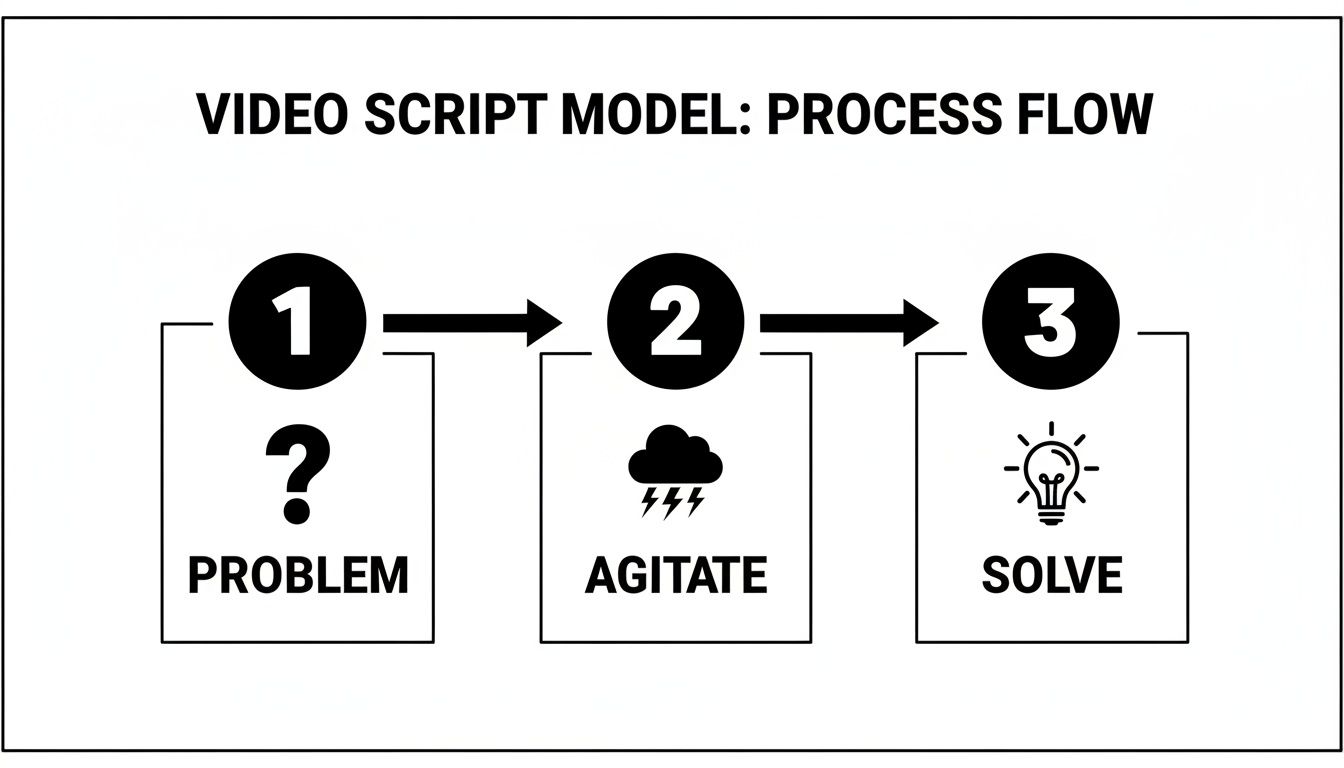
This flow shows exactly how the story moves from a relatable pain point to the clear resolution your product offers. When you visualize your script like this, you create a blueprint that keeps your production team focused and your message crystal clear.
Smart Production Tips To Avoid Headaches
With your visual plan locked in, it’s time to actually bring your story to life—without breaking the bank or your timeline. You don’t need a Hollywood budget to create a slick, professional video, but you absolutely need a smart, efficient process. This is where you can dodge the common pitfalls that derail projects and inflate costs.
Whether you're working with an agency or your in-house team, the secret is focusing on a few critical elements that have an outsized impact on quality. A polished final product really comes down to nailing the details: the right voice, the perfect music, and clean, on-brand graphics.
Assembling Your Core Creative Assets
The audio and visual components you choose will define the entire mood and feel of your video. A rushed decision here can make even the best script feel cheap or unprofessional. It's worth spending the time to get these right.
- Source the Right Voiceover: The voice of your video is quite literally the voice of your brand. Look for an artist whose tone matches your company’s personality—whether that's authoritative and confident, friendly and approachable, or high-energy and exciting. Always listen to demos and pick someone who can make even complex sentences sound clear and conversational.
- Select Supportive Music: Background music should enhance the emotion, not distract from the message. You're looking for a track that complements the pacing of your script and has moments that swell or quiet down to emphasize key points in the narrative.
- Design Clean Graphics: Your on-screen text, icons, and any animations must be crisp, clear, and perfectly aligned with your brand guidelines. Consistency here is non-negotiable; it’s what builds brand recognition and trust. For a complete guide to managing all these moving parts, our video production checklist covers everything you'll need.
And for refining your video's audio—a super important element for clarifying complex messages—you can even learn how to do voiceovers on TikTok to practice getting your clarity and pacing just right.
The most common project killer isn’t a lack of budget; it’s a broken feedback process. Avoid the dreaded 'death by a thousand edits' by establishing a structured review cycle from day one.
This means getting all key stakeholders in a room (or on a call) for review at specific milestones, like after the first animated draft. Then, collect all feedback into a single, consolidated document. This gives the production team clear, actionable, and non-conflicting direction. This simple discipline is what keeps projects on track and ensures your simple video story doesn't get complicated by committee.
Common Questions About Product Storytelling Videos
Even with the best game plan, questions always pop up once you start digging into the work of turning a complex product into a simple video story. We get it. Here are a few of the most common ones we hear, along with some straight answers to help you out.
How Long Should My Explainer Video Be?
It's almost always shorter than you think. Seriously.
For a video living on social media or at the top of your marketing funnel, you really want to aim for 60 to 90 seconds. That’s the magic window for grabbing someone's attention and getting your main point across before they scroll away. We've seen engagement drop off a cliff after the two-minute mark.
Now, if your video is meant for an audience that's already bought in—say, on a product landing page or in an onboarding email—you've earned a little more time. You can probably stretch it to two or even three minutes. Just be ruthless with your script. Every single second has to earn its spot.
Should We Use Animation or Live-Action?
This is a big one, and the right answer really depends on your product and the story you're trying to tell. Both animation and live-action have their own superpowers when it comes to making complicated ideas feel simple.
To help you decide, here's a quick breakdown of which video style might be the best fit for you.
Which Video Style Should You Choose?
Let's unpack that a little more.
- Animation is your go-to for explaining abstract or invisible ideas. If your product is all about software interactions, data crunching, or anything else you can't easily point a camera at, animation is your best friend. It lets you build visual metaphors that make complex processes feel tangible.
- Live-action is all about creating a human connection. When you show real people getting real value from your product, it builds a level of trust and authenticity that's hard to replicate. This is especially powerful for products that have a direct, physical impact on someone's life.
A hybrid approach can be a game-changer. Start with live-action to show the human problem, then seamlessly switch to animated screen recordings or graphics to explain how your tech solves it. It's a powerful combo.
How Much Does a Good Product Video Cost?
Ah, the classic "it depends" question. While there's no single price tag, I can give you some realistic guardrails. A professionally produced animated explainer video from a small, solid studio can start at a few thousand dollars. For a highly customized video from a top-tier agency, you could be looking at $25,000 or more.
The main things that will move that number up or down are:
- Length and Complexity: More minutes and more intricate animations mean more time and resources, which naturally drives up the cost.
- Style: Custom 3D animation is almost always going to be more expensive than 2D character animation or slick motion graphics.
- Timeline: Need it yesterday? Rush jobs often come with extra fees to make it happen.
Think of your video as a long-term asset, not just a one-off expense. The right video doesn't just explain your product; it drives conversions, cuts down on support tickets, and makes your customers feel understood. When you look at it that way, a great video delivers a clear return on investment.
Ready to turn your complex product into a simple, compelling story? With Moonb, you get an entire creative department on demand. We handle everything from scriptwriting and storyboarding to animation and voiceover, delivering high-quality videos that make your audience say "I get it." Learn more and see how it works at https://moonb.io.