Motion Graphics Services How to Plan and Hire
Explore motion graphics services to learn types, workflows, costs, and how to hire the right team. Get expert tips, KPIs, and a practical checklist.

You know the moment. The campaign calendar is packed, your in-house team is already stretched thin, and every static asset on the page feels a little flat next to what your competitors are shipping. Motion graphics services help you take a message, a product, or a single data point and turn it into something people grasp faster and hold onto longer. If you’re hiring for motion work, I’d argue the real question isn’t what can be animated. It’s how you set the work up so it ships cleanly, stays on brand, and lands on time.
Getting Started with Motion Graphics Services
I usually get the call from a marketing lead at the exact point where static creative stops carrying the message. The product still needs explaining, the campaign still needs variety, and the team still needs assets that feel alive without every brief turning into a full film shoot. If that sounds like your week, Moonb’s motion animation guide helps frame the first decision: whether the work should follow a full video path or stay focused on motion only.
This short TED-Ed explainer on how animation creates the illusion of motion is a nice primer on the mechanics behind every piece of motion work below.
Motion graphics services sit in the practical middle ground. We take designed elements, like type, shapes, charts, icons, product screens, and branding assets, and animate them so the message lands faster.
The cost conversation usually follows soon after. Buyers often start with one request, then discover the real expense isn’t the animation time. It’s the planning, the versioning, the review cycles, and the format changes needed to keep one idea working across paid social, sales decks, product launches, and internal training. That’s the part teams almost always underestimate. Motion graphics are rarely a one-off asset. They’re an operating model for repeatable creative output, and I tell clients that on the first call so nobody is surprised three weeks in.
The market reflects that broader use. Analysts at Wise Guy Reports describe a motion graphics market shaped by advertising, television, film production, and video games, which shows how widely motion now supports commercial storytelling. That matters because buyers are no longer asking only for attractive animation. They need explainers, paid social, product demos, internal training, and sales support, often on a weekly cadence. The strongest motion work I’ve seen starts with the message and the brand system, then earns every movement.
Understanding Motion Graphics Services and Types
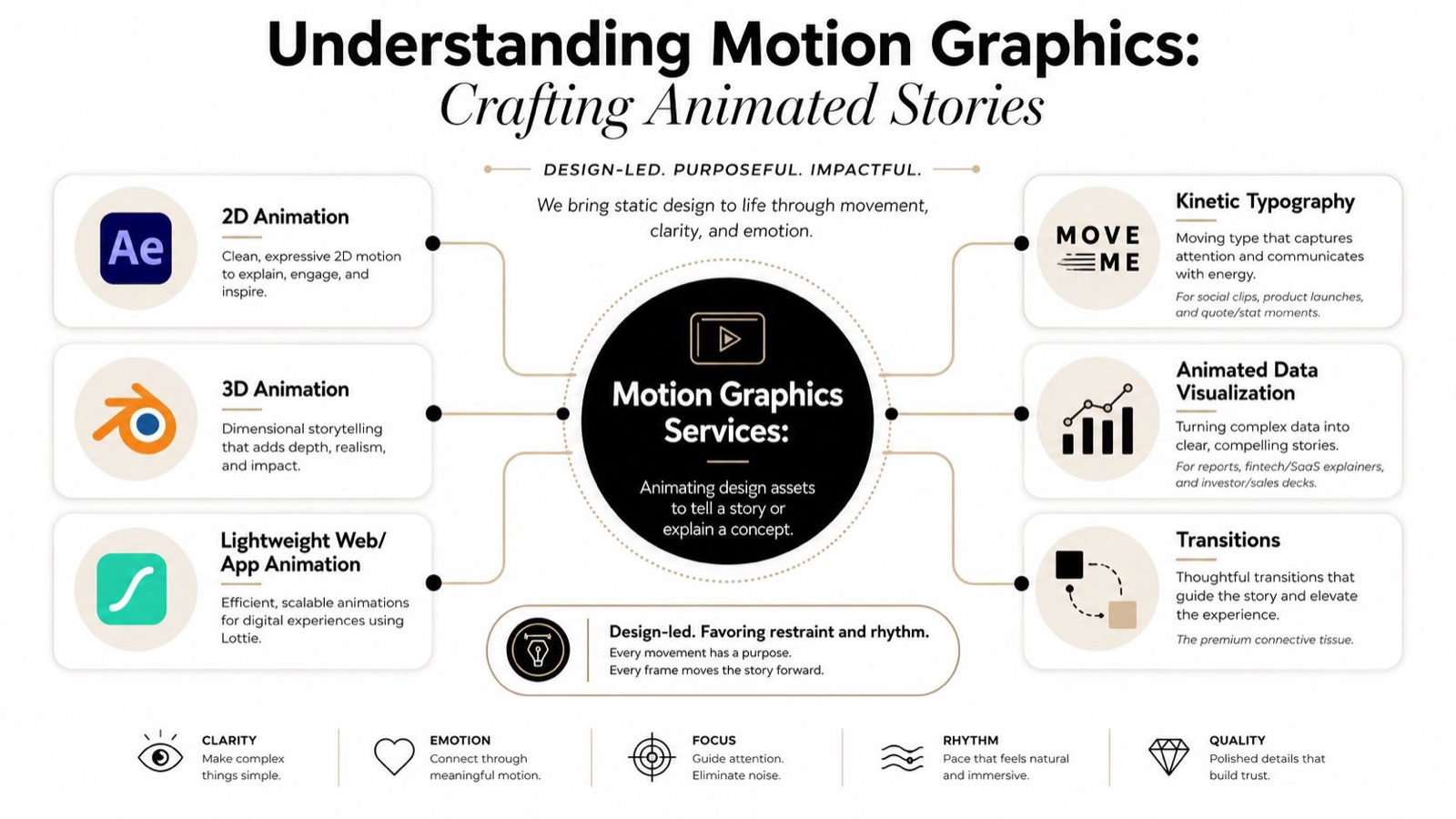
Motion graphics services sit in a simple place in the creative stack. They’re about animating design assets to tell a story or explain a concept, not building character-led films from scratch. On our jobs we lock type, color, grid, and easing first, then animate from that system. That’s the difference I keep coming back to: movement that supports the message versus movement that just fills time.
The main service types
2D animation is the most common entry point. We often build it in After Effects for explainers, paid social, intros, lower thirds, and product UI motion. It’s the right fit when the brand needs clarity and speed more than visual spectacle.
3D animation expands what you can show. Our designers reach for Cinema 4D or Blender when the product needs depth, rotation, space, or a more tactile feel. It works well for launches, hero moments, and product reveals where surface, form, or mechanism matters.
Kinetic typography is animated text that does the heavy lifting. Use it for social clips, product launches, and quote or stat moments, where the words need to hit fast and stay on brand.
UI motion covers interfaces, screens, transitions, and lightweight product behavior. A common choice here is Lottie, especially when teams need lightweight web or app animation that feels polished without adding unnecessary weight.
Practical rule: if the viewer needs to understand the idea in a few seconds, motion should guide the eye. If the viewer needs to feel the product, motion should reveal hierarchy and cause and effect.
Market demand reflects that split, with independent analysts describing a motion graphics services market growing steadily and skewing heavily toward social video and explainers Intel Market Research. If your team needs help choosing a motion style, Moonb’s motion graphics type guide is a useful reference point.
Common Deliverables Formats and Use Cases
The file you choose affects more than export settings. It changes how the work moves through editing handoff, ad platform checks, web playback, and later reuse across channels. A motion project can also need more than one final version, because the version that works for paid social is often not the version a broadcast team or product team wants. I’ve watched a great asset stall for a week because nobody agreed on the finishing format up front.
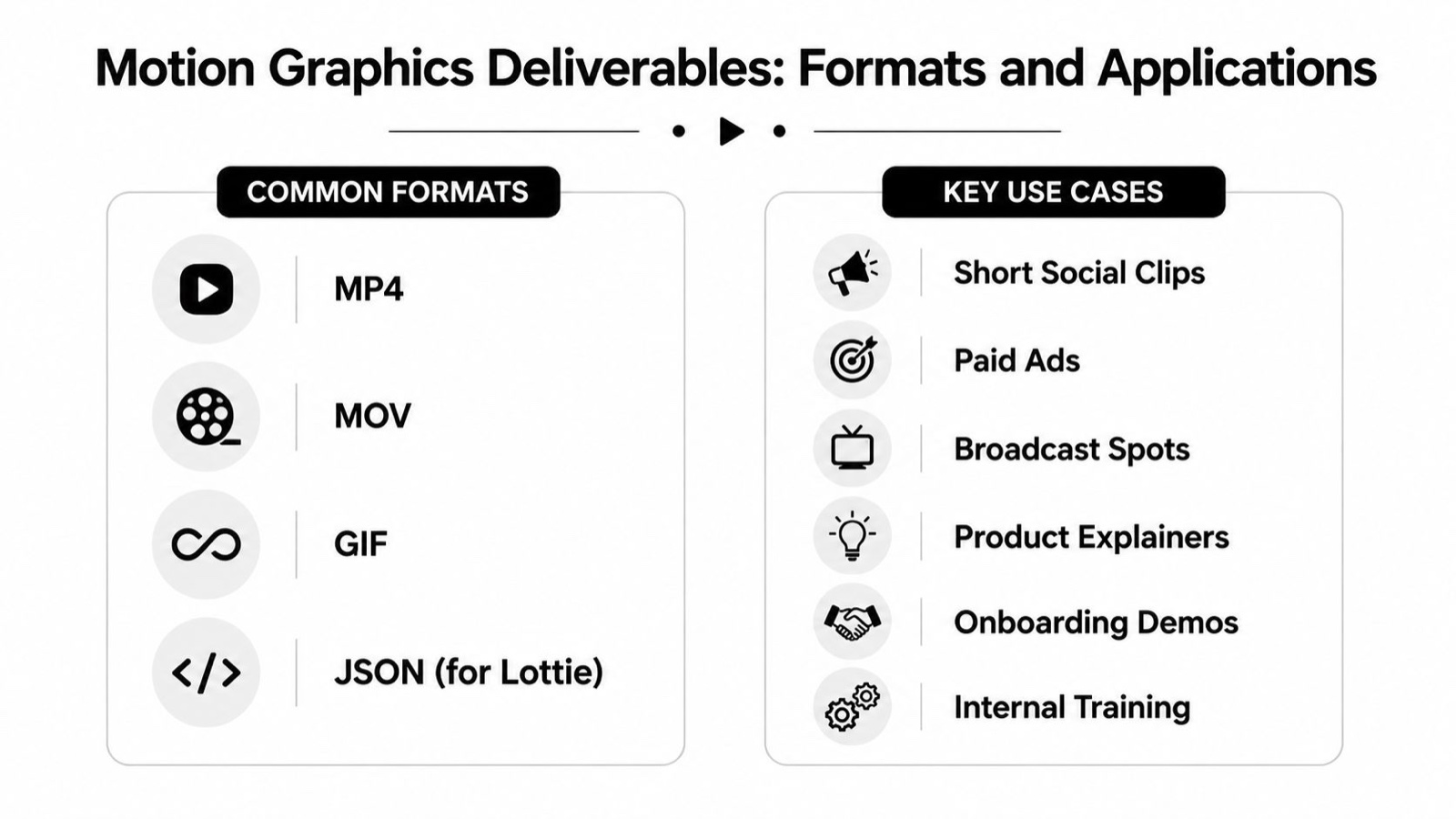
Standard delivery for motion graphics often includes MP4 and QuickTime MOV, with codecs such as H.264 and ProRes, and resolutions like 1920x1080, 2K, or 4K. Those choices are not just technical labels. They decide whether the asset is easy to post, easy to finish, or easy to hand off to another team Moonb’s video format guide.
Match the file to the job
A short social clip usually wants MP4 because it moves cleanly across platforms and is simple for ad ops to place. A paid ad needs the same practicality, plus framing that keeps the message readable on a small screen.
A broadcast spot often leans on MOV or ProRes because downstream teams need cleaner finishing options and more room for color and edit work. A product explainer can live comfortably in either MP4 or MOV, depending on how much revision happens after handoff.
An onboarding demo or internal training piece needs a format that is easy to share, easy to update, and easy to watch on common devices. A GIF sits in a different bucket. It is useful for short loops, but it can fall apart quickly if the source is compressed too hard. For teams that need sharper motion loops, creating sharp, smooth GIFs is a practical reference for what clean playback requires.
A quick format map
- MP4, best for social, paid, and web playback.
- MOV, best when editing or broadcast workflows matter.
- GIF, best for short loops, lightweight web use, and simple demonstrations.
- JSON for Lottie, best for app and site animation where file weight matters.
Format choice also affects how often a team can keep producing. A studio that only exports one version may move faster on paper, but the hidden cost shows up later when a client asks for a new aspect ratio, a lighter file, or a version for a different channel. I plan deliverables with clients together at the start, so the same animation system can feed weekly content without rebuilding the whole piece each time.
Motion Graphics Production Workflow and Timeline
A solid motion project doesn’t start in animation software. It starts with a brief, because the most expensive mistakes happen before the first keyframe is ever set. Motion production usually moves from storyboarding and design into animation, review, and final finishing, and weak preproduction discipline can force rework later and increase turnaround time GITNUX, service motion graphic.
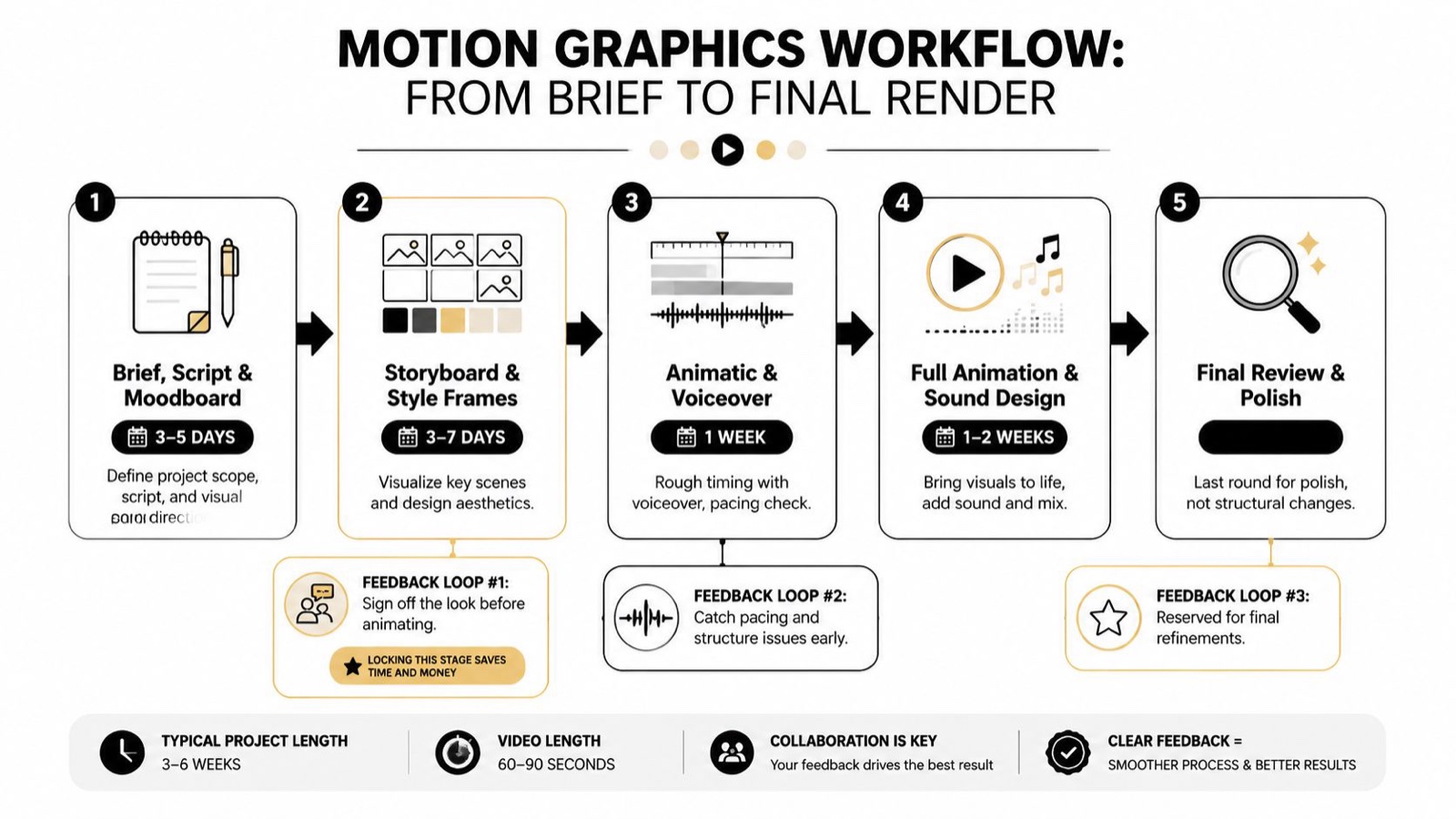
A realistic 60 to 90 second explainer timeline
A typical 60 to 90 second explainer runs about 3 to 6 weeks. The first 3 to 5 days usually go into the brief, script, and moodboard. That’s where we align on message, tone, and visual direction.
The next 3 to 7 days are for storyboard and style frames. This is feedback loop #1, and I’ll say it plainly: it’s the most important lock point in the whole job. Sign off the look before animating, because redlining a still frame is far cheaper than reworking a finished scene.
After that comes about 1 week for the animatic and rough voiceover. This is feedback loop #2, where pacing and structure get tested before the project turns expensive.
The final 1 to 2 weeks go into full animation, sound design, and mix, followed by feedback loop #3 for polish. That last round should stay focused on refinement, not structural change.
Lock the storyboard and style frames before animation. That’s where good studios save time and money, because every later change costs more.
If you want a broader view of the handoff points, Moonb’s animation process guide sits well alongside this workflow.
Pricing and Engagement Models for Motion Graphics Services
Motion graphics pricing is easier to understand if you separate it into three models. A per-project fee buys one asset with a defined scope. A retainer keeps a stream of work moving. An embedded team acts like a dedicated creative partner and is usually the best fit when weekly motion output is part of the job, not the exception.
Comparison of Engagement Models for Motion Graphics
| Model | Typical Cost Range | Best For | Pros | Cons |
|---|---|---|---|---|
| Per-project fee | Varies by scope | One-off launch videos, single ads, isolated explainers | Clear deliverable, easy to approve | Repeated buying, less predictable cadence |
| Retainer | Varies by scope | Ongoing campaigns, recurring social, steady revisions | Predictable rhythm, easier planning | Can underfit spikes or slow weeks |
| Embedded team | Varies by scope | Weekly output, multi-channel brand systems, ongoing motion support | Consistency, faster iteration, closer collaboration | Needs clear process and ongoing coordination |
A dedicated team model matters when you’re not really buying a file, you’re buying throughput. Moonb runs this way. We work as an embedded creative team that delivers on a steady weekly rhythm, on brand and ready when you need it. That setup fits marketing leaders who need repeat motion work without rebuilding the brief every single time.
The hidden cost in motion isn’t always line-item pricing. It’s the time lost when feedback arrives too late, when the brand system isn’t clear, or when the team treats every request like a one-off. The best model is the one that matches how often your team really needs motion, not how glamorous the final render looks.
How to Evaluate Motion Graphics Providers
The right partner is usually the one who looks boringly consistent, not the one with the flashiest reel. I check five things first. If a shop misses one of them, the project tends to get slower, not better.
What to ask before you hire
- Portfolio consistency: Do they show the same quality across several pieces, or only in one hero reel?
- Turnaround fit: Can they match your campaign cadence, or will every round take longer than your launch window?
- IP transfer: Will you own the working files and final assets without friction?
- Compliance readiness: Can they handle regulated content if you work in finance, healthcare, or a similar field?
- Feedback structure: Do they build review checkpoints at storyboard, animatic, and final delivery?
The strongest motion partners don’t just deliver scenes. They manage an ongoing motion system. That’s the direction the whole category is moving, with ongoing production, embedded collaboration, and cross-channel motion systems replacing single-deliverable thinking.
A few red flags show up fast. If a provider can’t explain where revisions happen, if they dodge the question about file ownership, or if their portfolio jumps between styles with no brand control, you’ll probably spend more time managing them than using the work. If you want a broader vendor screen, Moonb’s motion graphics companies guide is a useful starting point for shaping your own scorecard.
Measuring Success with Motion Graphics Services
The cleanest measurement I know starts with retention. In YouTube Studio, Wistia, or Vimeo, I look at the audience retention curve, average watch time, and completion rate first. The curve tells you where viewers drop. The watch time tells you whether the whole piece holds attention. The completion rate tells you if the structure worked.
Downstream metrics matter too. I pair motion performance with click-through, conversion, and simple A/B tests. Compare the animated version against a static asset or a talking-head version of the same message, then look at which one moved people further down the funnel.
Buyers consistently tell us a clear animated explainer moves them further than a static asset, which is why we measure motion against the same funnel metrics as any other campaign work rather than against a headline statistic.
Don’t chase one vanity metric. A motion asset that gets watched but never changes behavior isn’t doing enough work.
When a video is losing viewers in the first few seconds, the issue is usually the opening, not the animation polish. When the watch time is strong but the clicks are weak, the call to action or the offer is probably too soft. Measure the motion the same way you’d judge any other campaign asset, by what people do after they watch.
Hiring Guide and Practical Checklist
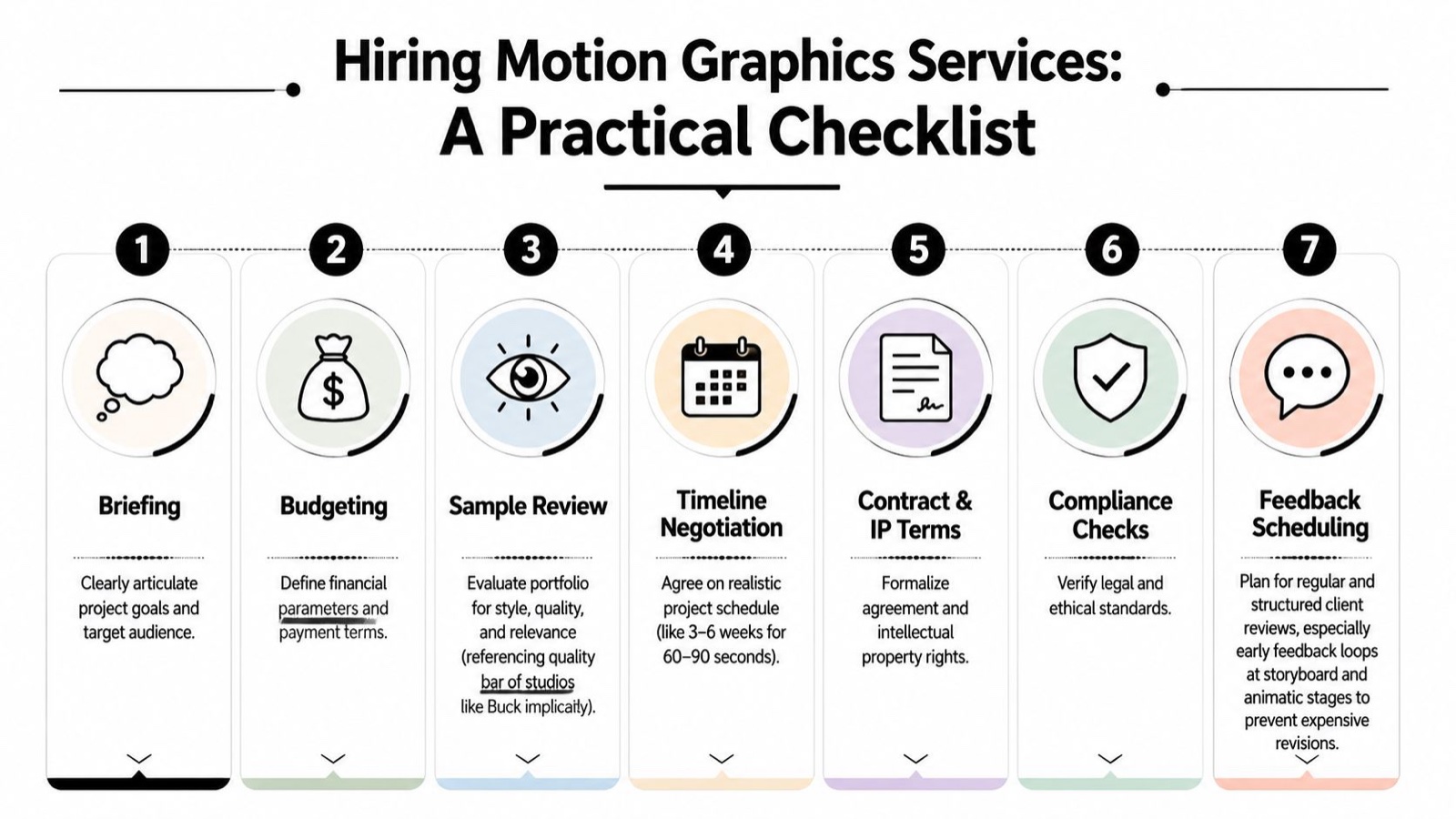
Hiring gets easier when the brief is clear and the review points are set before work starts. That matters because most motion problems trace back to vague scope, loose timing, and missing ownership terms. A strong hiring process works like a production map. It shows who is doing what, when the team reviews, and where the hidden costs can show up.
A practical hiring checklist
- Briefing. State the goal, audience, message, and platform first. If the team cannot explain the job back to you in plain language, the brief is not ready.
- Budgeting. Decide how you want to buy the work, per project, retainer, or embedded team, then match that choice to your real weekly cadence.
- Sample review. Look for style consistency, not just one standout piece. Quality bars like Buck, Ordinary Folk, and Oddfellows matter because they show discipline, not just taste.
- Timeline negotiation. Confirm a realistic window. For a 60 to 90 second explainer, 3 to 6 weeks is a sensible planning frame.
- Contract and IP terms. Make sure final files, source files, and ownership are clearly written down.
- Compliance checks. Confirm legal and ethical requirements before production starts, especially in regulated categories.
- Feedback scheduling. Lock the storyboard and animatic review dates before animation begins, so revisions happen early and the team does not lose a week to avoidable rework.
A good motion hire feels calm from the start. The team understands the brand. The review loops are clear. The export specs are agreed before the final pass. For the technical side, standard delivery often means MP4 or MOV, H.264 or ProRes, and 1080p, 2K, or 4K depending on where the asset will live Envato Author Help, accessed 2026.
Motion graphics services work best when you treat them like a repeatable system, not a one-off fix. Weekly output depends on more than animation talent. It also depends on briefing discipline, review ownership, version control, and a team that can absorb notes without stalling the schedule. If your team needs steady output, clear ownership, and a motion partner that can keep pace with weekly demand, start by tightening the brief, then choose the engagement model that matches the workload you actually have. When you’re ready, bring in a dedicated creative team like Moonb, share one active brief, and build the review rhythm before the first frame gets animated.
Frequently asked questions
A sixty to ninety second explainer usually runs three to six weeks, most of it in planning, not animation. The lock points that save the most time are signing off the storyboard and style frames before anyone animates, because changing a still frame is far faster than reworking a finished scene.
Per project buys one asset with a defined scope, which suits a single launch. An embedded team keeps a steady stream of motion moving each week across channels, with the brand system held consistent. Pick the model by how often you actually need motion, not by how the final render looks.
Start with retention and completion in your video platform, then pair it with click-through and conversion, and A/B the animated version against a static one. If viewers drop in the first few seconds the opening is the problem, not the polish. Judge motion by what people do after they watch.



